A reliable WiFi network has become an important part of everyday business. Employees need stable access to cloud applications, customers may need guest WiFi, and businesses increasingly depend on connected devices.
For businesses in Tanzania, choosing the right WiFi setup depends on factors such as office size, number of users, building layout, connected devices and future network requirements.
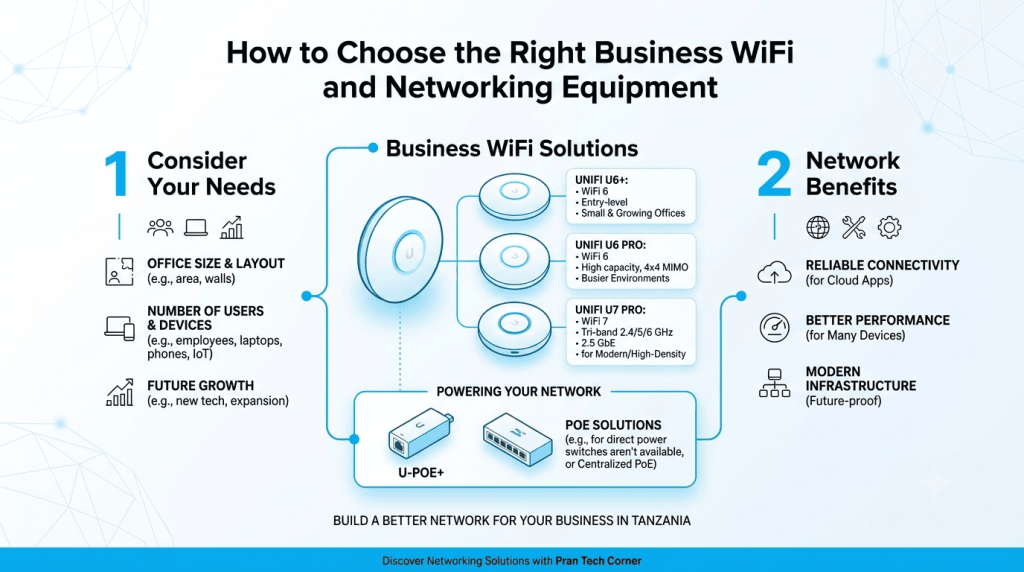
Pran Tech Corner provides networking equipment and technology solutions for businesses in Tanzania, including Ubiquiti UniFi products. The UniFi U6+, U6 Pro and U7 Pro offer different options for businesses looking to build or upgrade their wireless network.
In this guide, we look at these UniFi access points, where they fit, and what Tanzanian businesses should consider before setting up a business WiFi network.
Choosing the Right UniFi WiFi Solution for Your Business in Tanzania:
UniFi U6+: A Practical Choice for Small and Growing Offices:
The UniFi U6+ is a WiFi 6 access point for businesses that need modern wireless connectivity without moving to WiFi 7.
It supports 2.4 GHz and 5 GHz WiFi, has a Gigabit Ethernet uplink and supports 300+ listed clients.
The U6+ can be suitable for:
- Small and medium offices
- Retail outlets
- Branch offices
- Meeting rooms
- Professional workspaces
For a growing business in Tanzania, the U6+ can be a practical starting point for a modern business WiFi network.
UniFi U6 Pro: For Busier Business Environments:
The UniFi U6 Pro is another WiFi 6 option, designed for environments where wireless demand is higher.
It has six spatial streams and a 4×4 radio configuration on 5 GHz, along with a Gigabit Ethernet uplink.
It can be considered for:
- Busy offices
- Training centres
- Retail and hospitality
- Larger workspaces
- Offices with multiple connected devices
The U6 Pro can be useful where businesses need more wireless capacity while continuing with a WiFi 6 network.
UniFi U7 Pro: For Businesses Moving to WiFi 7:
The UniFi U7 Pro brings WiFi 7 to business networks. It supports 2.4 GHz, 5 GHz and 6 GHz and uses a 2.5 GbE uplink.
This makes it particularly relevant for businesses in Tanzania that are planning a newer wireless infrastructure or have newer WiFi 6E and WiFi 7 devices.
The U7 Pro can be considered for:
- High-density offices
- Modern business environments
- Businesses upgrading their WiFi infrastructure
- Offices using newer wireless devices
- Networks requiring a 2.5 GbE uplink
Ubiquiti U-PoE+: Supporting Your UniFi Access Point Setup:
A reliable WiFi installation also needs the right power setup. The Ubiquiti U-PoE+ is a PoE+ adapter that can provide power to compatible UniFi devices through the network connection.
It can be useful where a suitable PoE switch is not available at the installation point.
For businesses in Tanzania setting up individual access points, branch offices or smaller deployments, a PoE adapter can make installation more straightforward. Larger deployments may instead use a central PoE switch to power multiple access points.
Which UniFi Setup Makes Sense for Your Business?
The choice depends on the size of the business, number of connected devices and the type of network being planned.
- U6+: Small and growing offices
- U6 Pro: Busier business environments
- U7 Pro: Newer WiFi 6E/WiFi 7 requirements
- U-PoE+: Powering compatible UniFi devices where a PoE switch is not available
This way, all four products have a clear purpose, rather than making the article feel like a product catalogue. It also keeps the focus firmly on business WiFi in Tanzania.
What Should Businesses in Tanzania Consider Before Installing WiFi?
1. Coverage and Access Point Placement.
Even a good access point can perform poorly if it is placed in the wrong location.
Walls, floors, furniture and other obstacles can affect wireless coverage. Businesses should plan AP placement according to the actual office or building layout instead of simply installing an AP wherever a weak signal is reported.
2. Number of Users and Devices.
The number of employees is only one part of the calculation.
A business may have employees using laptops and smartphones alongside printers, cameras, POS systems and other connected devices. Planning should therefore consider the total number of connected devices.
3. The Network Behind the Access Point.
An access point is only one part of the network.
The U6+ and U6 Pro use Gigabit Ethernet uplinks, while the U7 Pro uses a 2.5 GbE uplink. The switch, Ethernet cabling and wider network infrastructure should therefore be able to support the access point being installed.
4. Power and PoE.
Power over Ethernet allows compatible access points to receive power and network connectivity through Ethernet cabling.
The Ubiquiti U-PoE+ is a PoE+ adapter that can be used with compatible devices where a suitable PoE switch is not available at the installation point.
For larger deployments, businesses may instead use a suitable PoE switch to centralise power and network connectivity.
Common WiFi Problems in Tanzanian Businesses:
- Q: Why is WiFi connected but there is no internet?
A: The device may be connected to the access point while the router or ISP connection is unavailable. The gateway, DHCP and WAN connection should be checked.
- Q: Why is WiFi slow even though the internet plan is fast?
A: Congestion, weak signal, interference, too many users or a limited network uplink can affect WiFi performance.
- Q: Why does WiFi keep disconnecting?
A: Weak coverage, interference or roaming issues can cause repeated disconnections. AP placement and wireless configuration should be reviewed.
- Q: Why is the WiFi signal weak in some parts of the office?
A: Walls, floors, distance and poor AP placement can reduce coverage. Repositioning the AP or adding another one may improve coverage.
- Q: Why does WiFi become slow when many people connect?
A: Wireless capacity is shared between connected devices. Using multiple APs and making better use of 5 GHz or 6 GHz where supported can improve capacity.
Build Your Business WiFi with Pran Tech Corner
From a small office to a larger commercial network, the right WiFi setup depends on coverage, users, devices and future requirements.
The UniFi U6+, U6 Pro and U7 Pro give businesses different options for WiFi 6 and WiFi 7 deployments, while the U-PoE+ can support compatible PoE requirements.
For UniFi access points and business networking solutions in Tanzania, explore the networking products available from Pran Tech Corner and choose the setup that fits your business requirements.
Looking for the right UniFi access point for your business? Pran Tech Corner provides networking equipment and solutions for businesses in Tanzania. You can explore the Pran Tech Corner networking solutions or browse the available networking products and speak with the team about your requirements.
Frequently Asked Questions:
Which UniFi access point is suitable for a small business in Tanzania?
The U6+ can be a practical option for a small or growing business that needs WiFi 6 connectivity. The final choice depends on users, devices, coverage and network requirements.
Is the U7 Pro suitable for businesses in Tanzania?
Yes. The U7 Pro is designed for WiFi 7 and supports 2.4 GHz, 5 GHz and 6 GHz, making it suitable for businesses planning newer wireless infrastructure.
Does the U7 Pro need a 2.5 GbE network?
The U7 Pro has a 2.5 GbE Ethernet uplink, so businesses should consider compatible switching and cabling to make full use of its wired connectivity.
Can different UniFi access points be used in the same business network?
Yes. Different compatible UniFi access points can be used within the same network where different areas have different capacity or coverage requirements.
Where can I get UniFi networking equipment in Tanzania?
Pran Tech Corner provides networking products and solutions for businesses in Tanzania, including UniFi networking equipment.