
CCTV and Access Control Systems in Tanzania: How to Plan an Integrated Business Security Setup
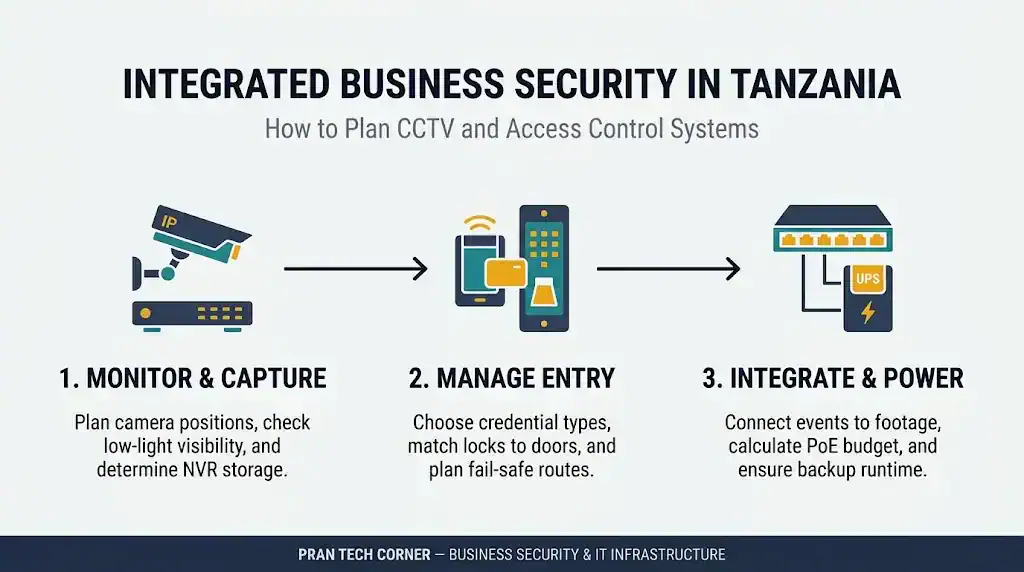
Plan an integrated CCTV and access control system for your business in Tanzania. Learn how to connect IP cameras, NVRs, door readers, and PoE networks with reliable UPS backup
The Right Networking Setup for Small and Medium Businesses in Tanzania: MikroTik hEX S, hAP ax², and L009
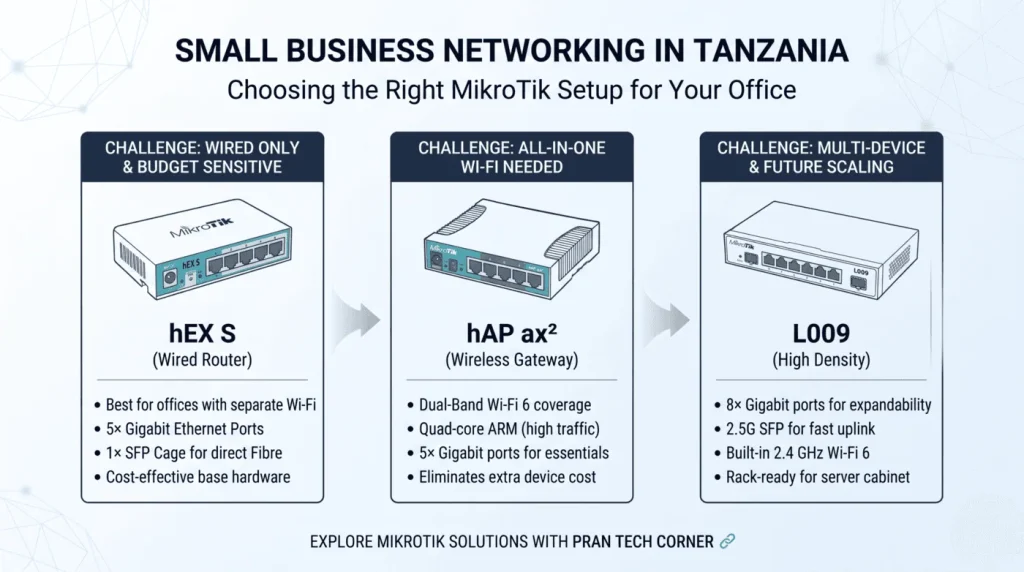
A reliable network is essential for businesses of every size. From connecting computers and point-of-sale terminals to supporting enterprise Wi-Fi, cloud accounting, and daily VoIP communication, the right hardware keeps teams productive and prevents costly downtime. When evaluating small business networking solutions in Tanzania, infrastructure requirements vary widely based on office layout, total client devices, and branch structure. Whether operating from a single office in Dar es Salaam or coordinating regional teams in Arusha, Dodoma, or Mwanza, companies need reliable hardware. While a boutique practice may require only a straightforward plug-and-play wired or wireless router, a growing enterprise often demands granular bandwidth control, VLAN segmentation, and flexible uplink options. MikroTik delivers enterprise-level RouterOS routing capabilities at an accessible price point. Three of the most practical options for Tanzanian SMEs are the hEX S, hAP ax², and L009. Why Small and Medium Businesses Need the Right Network Setup A commercial network does far more than distribute an internet connection. It establishes the backbone that secures internal files, isolates guest traffic, and ensures business-critical applications receive priority bandwidth over recreational browsing. A properly planned network architecture enables an SME to: Also read: Scaling Business WiFi in Tanzania: From Small Office to Enterprise with UniFi U6+, U6 Pro, and U7 Pro 3 Proven Small Business Networking Solutions in Tanzania: Selecting Your MikroTik Router. Different business models call for different physical interfaces and wireless configurations. Selecting the right hardware balances Ethernet port density, fibre handoff capability, and Wi-Fi coverage requirements. Which Router Fits Your Office? MikroTik hEX S (Pure Wired Routing) MikroTik hAP ax² (All-in-One Wi-Fi 6) MikroTik L009 (High Port Density) Ethernet Ports 5× Gigabit Ethernet 5× Gigabit Ethernet 8× Gigabit Ethernet SFP Cage (Uplink) 1× 1.25G SFP None 1× 2.5G SFP Wi-Fi Connectivity None (Requires External AP) Dual-Band Wi-Fi 6 (2.4 & 5 GHz) Single-Band Wi-Fi 6 (2.4 GHz only) PoE Support Passive PoE-in & PoE-out (Port 5) Passive PoE-in & PoE-out Passive PoE-in & PoE-out (Port 8) Form Factor Compact Desktop / Fanless Multi-position Desktop Tower Metal Desktop / 1U Rackmount Ready Best Suited For Workspaces with separate ceiling access points Small offices, cafes, and open work areas Multi-device offices, server racks, & branch hubs 1. MikroTik hEX S: For Wired-First Workspaces The MikroTik hEX S (RB760iGS) is a compact, fanless wired router equipped with five Gigabit Ethernet ports, a micro-SD slot, and an SFP cage. It is purpose-built for legal practices, accounting firms, and clinics where workstations, printers, and network storage connect primarily via physical Ethernet drops. Key Strengths: Best fit: Offices that run physical cabling to desks and prefer installing dedicated ceiling access points for wireless coverage. Detailed hardware technical specifications can be verified directly on the MikroTik official documentation. 2. MikroTik hAP ax²: For All-in-One Wired and Wi-Fi 6 Coverage. The MikroTik hAP ax² (C52iG-5HaxD2HaxD-TC) integrates commercial routing with modern dual-band Wi-Fi 6 (802.11ax) across both the 2.4 GHz and 5 GHz frequency bands, backed by a quad-core 64-bit ARM CPU. This makes it an attractive all-in-one gateway for small consultancies, retail hubs, and open-plan offices that require immediate wireless access alongside wired ports. Key Strengths: Best fit: Single-floor corporate offices, creative agencies, and retail branches needing reliable modern Wi-Fi and routing in a single chassis. 3. MikroTik L009: For Higher Port Density and Flexible Uplinks The MikroTik L009 (L009UiGS-2HaxD-IN) is engineered as a robust successor to the legacy RB2011 series. It provides eight Gigabit Ethernet ports, a 2.5G-capable SFP cage, and a built-in 2.4 GHz Wi-Fi 6 radio housed in a durable metal enclosure that doubles as a passive heatsink. It is designed for growing businesses that require extra physical switch ports and high-bandwidth network uplinks. Key Strengths: Note on Wireless: Because the onboard wireless on this model is dedicated to the 2.4 GHz spectrum, businesses requiring high-throughput 5 GHz wireless should deploy supplemental dual-band access points throughout the premises. Explore: How to Choose the Right Business WiFi and Networking Equipment in Tanzania with UniFi U6+, U6 Pro, U7 Pro and U-PoE+ Planning Practical Small Business Networking Solutions in Tanzania. Before purchasing hardware, evaluate operational and environmental factors to ensure stable daily performance: Deploy Reliable Small Business Networking Solutions in Tanzania with Pran Tech Corner. Selecting the right hardware prevents network instability and eliminates unnecessary IT expenses as your company scales. Whether configuring an initial wired setup with the hEX S, deploying an all-in-one wireless hub with the hAP ax², or scaling branch port capacity with the L009, MikroTik provides granular network control for modern enterprises. Pran Tech Corner supplies authentic networking equipment, routers, switches, and wireless hardware across Tanzania. Based on India Street in Dar es Salaam, we provide local stock availability, technical guidance, and reliable delivery across Dar es Salaam, Arusha, Moshi, Mwanza, Dodoma, and Mbeya.
How to Choose the Right Business WiFi and Networking Equipment in Tanzania with UniFi U6+, U6 Pro, U7 Pro and U-PoE+
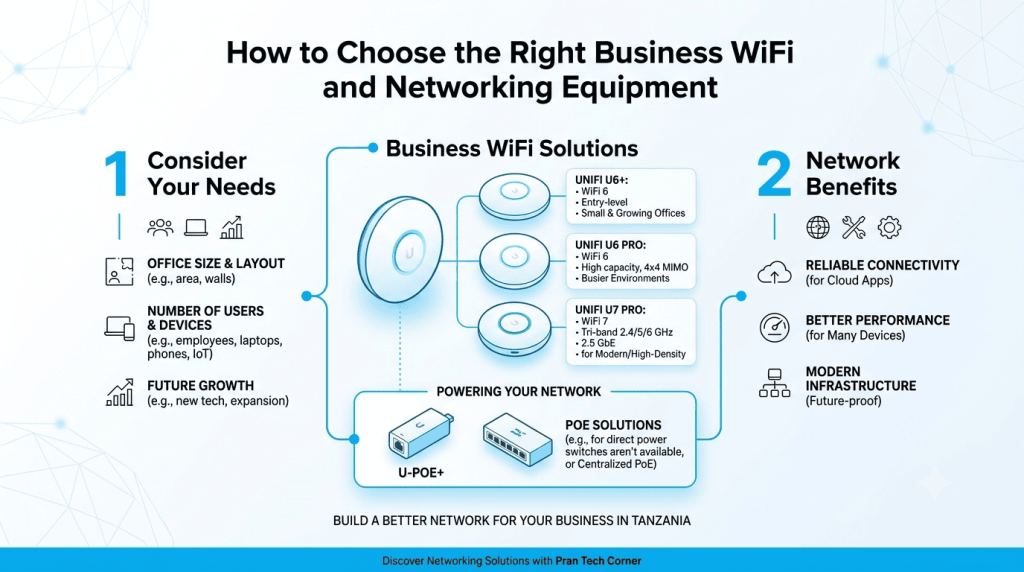
A reliable WiFi network has become an important part of everyday business. Employees need stable access to cloud applications, customers may need guest WiFi, and businesses increasingly depend on connected devices. For businesses in Tanzania, choosing the right WiFi setup depends on factors such as office size, number of users, building layout, connected devices and future network requirements. Pran Tech Corner provides networking equipment and technology solutions for businesses in Tanzania, including Ubiquiti UniFi products. The UniFi U6+, U6 Pro and U7 Pro offer different options for businesses looking to build or upgrade their wireless network. In this guide, we look at these UniFi access points, where they fit, and what Tanzanian businesses should consider before setting up a business WiFi network. Choosing the Right UniFi WiFi Solution for Your Business in Tanzania: UniFi U6+: A Practical Choice for Small and Growing Offices: The UniFi U6+ is a WiFi 6 access point for businesses that need modern wireless connectivity without moving to WiFi 7. It supports 2.4 GHz and 5 GHz WiFi, has a Gigabit Ethernet uplink and supports 300+ listed clients. The U6+ can be suitable for: For a growing business in Tanzania, the U6+ can be a practical starting point for a modern business WiFi network. UniFi U6 Pro: For Busier Business Environments: The UniFi U6 Pro is another WiFi 6 option, designed for environments where wireless demand is higher. It has six spatial streams and a 4×4 radio configuration on 5 GHz, along with a Gigabit Ethernet uplink. It can be considered for: The U6 Pro can be useful where businesses need more wireless capacity while continuing with a WiFi 6 network. UniFi U7 Pro: For Businesses Moving to WiFi 7: The UniFi U7 Pro brings WiFi 7 to business networks. It supports 2.4 GHz, 5 GHz and 6 GHz and uses a 2.5 GbE uplink. This makes it particularly relevant for businesses in Tanzania that are planning a newer wireless infrastructure or have newer WiFi 6E and WiFi 7 devices. The U7 Pro can be considered for: Ubiquiti U-PoE+: Supporting Your UniFi Access Point Setup: A reliable WiFi installation also needs the right power setup. The Ubiquiti U-PoE+ is a PoE+ adapter that can provide power to compatible UniFi devices through the network connection. It can be useful where a suitable PoE switch is not available at the installation point. For businesses in Tanzania setting up individual access points, branch offices or smaller deployments, a PoE adapter can make installation more straightforward. Larger deployments may instead use a central PoE switch to power multiple access points. Which UniFi Setup Makes Sense for Your Business? The choice depends on the size of the business, number of connected devices and the type of network being planned. This way, all four products have a clear purpose, rather than making the article feel like a product catalogue. It also keeps the focus firmly on business WiFi in Tanzania. What Should Businesses in Tanzania Consider Before Installing WiFi? 1. Coverage and Access Point Placement. Even a good access point can perform poorly if it is placed in the wrong location. Walls, floors, furniture and other obstacles can affect wireless coverage. Businesses should plan AP placement according to the actual office or building layout instead of simply installing an AP wherever a weak signal is reported. 2. Number of Users and Devices. The number of employees is only one part of the calculation. A business may have employees using laptops and smartphones alongside printers, cameras, POS systems and other connected devices. Planning should therefore consider the total number of connected devices. 3. The Network Behind the Access Point. An access point is only one part of the network. The U6+ and U6 Pro use Gigabit Ethernet uplinks, while the U7 Pro uses a 2.5 GbE uplink. The switch, Ethernet cabling and wider network infrastructure should therefore be able to support the access point being installed. 4. Power and PoE. Power over Ethernet allows compatible access points to receive power and network connectivity through Ethernet cabling. The Ubiquiti U-PoE+ is a PoE+ adapter that can be used with compatible devices where a suitable PoE switch is not available at the installation point. For larger deployments, businesses may instead use a suitable PoE switch to centralise power and network connectivity. Common WiFi Problems in Tanzanian Businesses: Build Your Business WiFi with Pran Tech Corner From a small office to a larger commercial network, the right WiFi setup depends on coverage, users, devices and future requirements. The UniFi U6+, U6 Pro and U7 Pro give businesses different options for WiFi 6 and WiFi 7 deployments, while the U-PoE+ can support compatible PoE requirements. For UniFi access points and business networking solutions in Tanzania, explore the networking products available from Pran Tech Corner and choose the setup that fits your business requirements. Looking for the right UniFi access point for your business? Pran Tech Corner provides networking equipment and solutions for businesses in Tanzania. You can explore the Pran Tech Corner networking solutions or browse the available networking products and speak with the team about your requirements. Frequently Asked Questions: