Business Security Guide · Tanzania
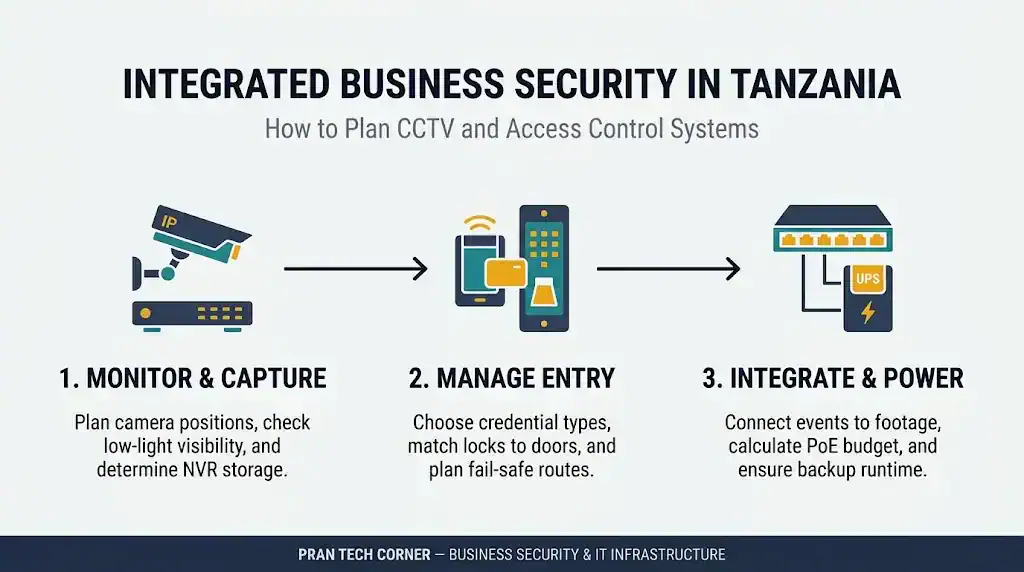
A business security system should do more than record activity or unlock a door. When CCTV and access control are planned together, a business can monitor key areas, manage entry permissions and investigate incidents using related video and access records. The important part is getting the cameras, door hardware, controllers, recording platform, network and backup power to work as one reliable system.
It is a business security setup that combines video surveillance with controlled entry. CCTV cameras capture activity, access control readers and controllers manage who can enter selected doors, and compatible software can connect door events with relevant video. The system also depends on suitable recording, network capacity, power backup and secure user permissions.
Why combine CCTV and access control in a business?
CCTV and access control solve related but different problems. CCTV helps a security team see what happened in a location. Access control determines whether a person is permitted to pass through a controlled entrance and records the relevant credential event.
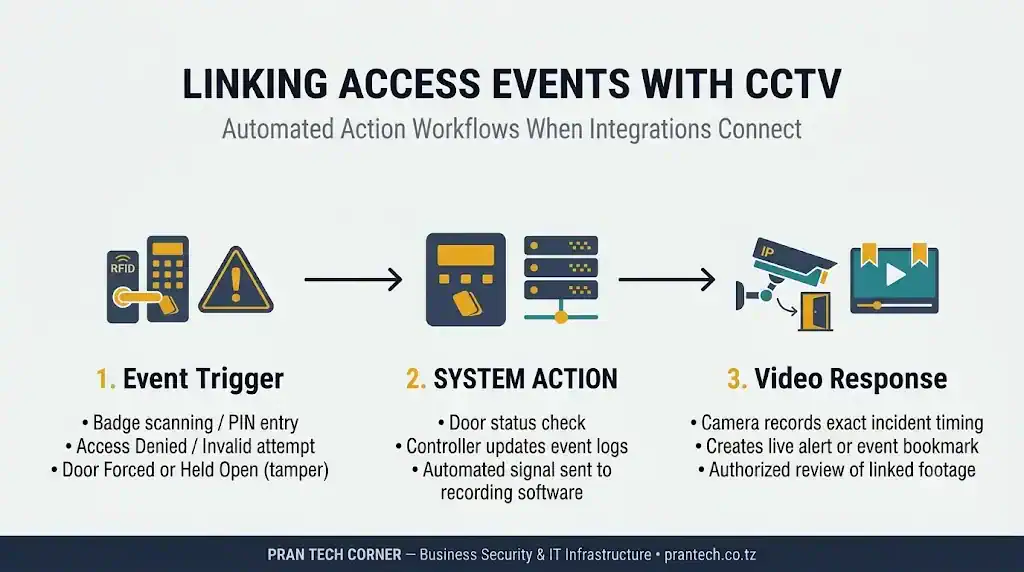
When compatible systems are linked, an authorised user may be able to review the video associated with a door event instead of searching through hours of recordings. This can make incident reviews more efficient and give security staff better context.
| Security function | What it does | What the business should confirm |
|---|---|---|
| Video surveillance | Monitors entrances, work areas, stock areas and other approved locations. | Useful camera views, suitable lighting, recording quality and retention. |
| Door access control | Grants or denies entry based on credentials, schedules and access rules. | Reader type, door controller capacity, lock type and emergency egress. |
| Video and access integration | Connects supported door events with related camera views or alerts. | Exact model compatibility, software support, licences and event behaviour. |
| Network and power | Carries system traffic and supplies power to connected equipment. | Switch capacity, PoE budget, cable routes, UPS coverage and secure configuration. |
Integration does not automatically mean that every function is shared between systems. Some installations only display event information beside a camera view. Others support more advanced workflows. Define the required result before selecting equipment.
What equipment makes up an integrated business security system?
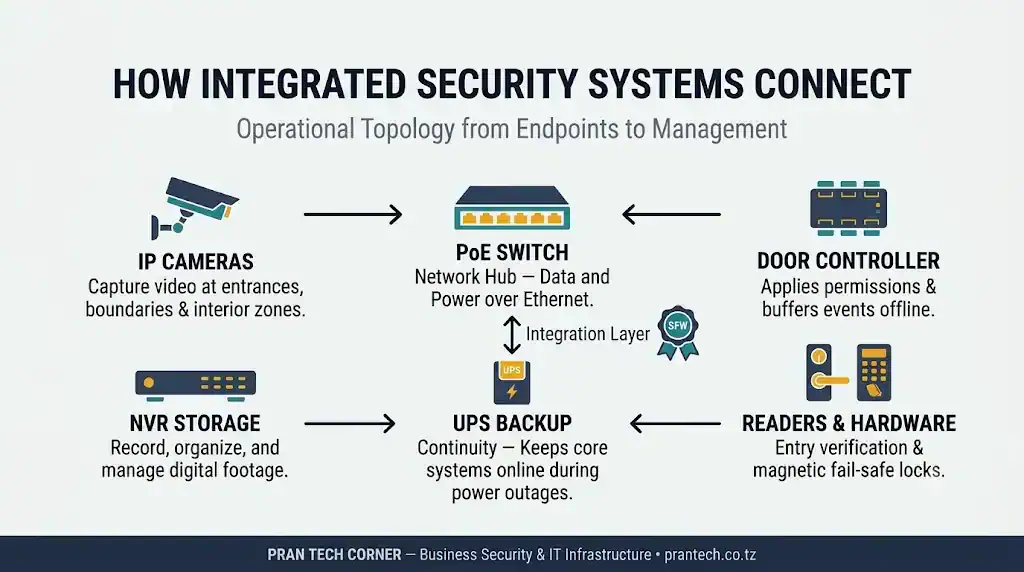
A typical IP-based setup has several connected layers. The final equipment list depends on the number of cameras, controlled doors, site layout, recording policy and the level of integration required.
| Component | Purpose | Key selection point |
|---|---|---|
| IP CCTV cameras | Capture video at entrances, corridors, counters, loading areas and other approved locations. | Lens, image detail, lighting, environment and the intended view. |
| NVR or video management platform | Records, organises and provides access to video. | Camera compatibility, channel count, incoming bandwidth, storage and software features. |
| Storage drives | Retain recorded footage for the chosen period. | Recording bitrate, schedule, retention target and recorder drive support. |
| Access readers | Read cards, PINs, mobile credentials or biometric credentials where supported. | Credential type, environment, security level and user workflow. |
| Door controllers | Apply access rules and manage connected doors and events. | Doors per controller, reader interfaces, local operation and software compatibility. |
| Locks and door accessories | Physically secure a door and provide status or exit functions. | Door construction, lock power, door sensor, exit device and life-safety requirements. |
| PoE switches and network cabling | Connect compatible cameras and network devices, with PoE supplying power where supported. | Port count, power budget, uplink capacity, cable route and network separation. |
| UPS and power protection | Keep selected network and security equipment running during short power interruptions. | Connected load, required runtime and which devices must remain powered. |
For a camera-by-camera selection process, see Pran Tech Corner’s guide to choosing CCTV cameras, NVRs and storage in Tanzania. For more detail on recorder capacity and retention calculations, read the guides to choosing an NVR by channels and bandwidth and estimating CCTV storage requirements. This article focuses on how those components fit into an integrated security design.
Plan doors, security zones and camera views before buying equipment
Start with a site plan, not a product list. Mark every public entrance, staff entrance, restricted room, vehicle access point and location where an incident would need to be investigated. Then decide which doors require access control and which camera views would provide useful evidence around those points.
| Business area | Access control consideration | CCTV planning consideration |
|---|---|---|
| Main entrance and reception | Visitor handling, staff credentials and reception release process. | Capture the approach to the entrance and the entry area without relying on one obstructed view. |
| Staff-only doors | Define who can enter and when access is permitted. | Position a view to show the doorway and the approach where practical. |
| Server or records room | Restrict access to named roles and review access events. | Monitor the entrance and any approved surrounding area, not private work activity unnecessarily. |
| Cash office or stockroom | Limit entry to authorised employees and review changes in access. | Choose views that show the entry and relevant activity while respecting privacy. |
| Warehouse loading bay | Control staff or contractor access where the risk assessment requires it. | Consider vehicle movements, loading activity, lighting and camera exposure to weather or dust. |
| Perimeter gate | Decide whether a reader, intercom, guard release or another method is appropriate. | Plan for the distance, lighting, vehicle position and environmental conditions. |
For every proposed camera, write down the question it must help answer. For example: “Who entered this door?” is different from “Can the security team observe the whole loading area?” A wide view may show activity but may not provide enough detail to identify a person at a distance.
Also consider lighting at the actual time of use, reflections from glass, backlighting, blind spots and objects that may obstruct the view. The camera position should support the security purpose rather than simply maximise the number of areas visible.
Choose the right access readers, controllers and door hardware
Access control should reflect how people use the building. A small office with one staff entrance has different needs from a warehouse with several controlled doors, visitor access and restricted storage areas.
1. Select the credential method
- RFID cards or key fobs: Often practical for staff access and straightforward credential replacement.
- PIN keypads: Can be used where a code-based process is appropriate. Shared PINs should be avoided where individual accountability matters.
- Biometric readers: May use fingerprint or facial credentials. Review the device capabilities, privacy implications and credential-management process before deployment.
- Mobile credentials: Can suit businesses that want to manage entry through supported mobile devices and software.
Do not choose a credential method based on appearance alone. Consider staff turnover, lost cards, visitor access, enrolment, revocation and what should happen when the controller or network is unavailable.
2. Check controller capacity and offline behaviour
Confirm how many doors and readers a controller supports, how credentials and access schedules are stored, whether events are buffered during a network interruption and how the system behaves if its management server is unavailable. These details vary by product and configuration.
3. Match the lock to the door
Magnetic locks, electric strikes and electric bolts are not interchangeable choices for every door. The correct option depends on the door construction, frame, access direction, existing hardware, power arrangement and required emergency-release behaviour.
Ask the installer to document whether each lock is fail-safe or fail-secure, how people exit during an emergency, how power loss is handled and which emergency release or door-status devices are required. Door locking must not compromise safe escape or applicable building and fire-safety requirements. Use a qualified professional to confirm the design for the site.
For a closer look at card readers, credentials and door hardware, see Pran Tech Corner’s guide to access control systems for offices.
4. Include door monitoring accessories
A complete door may also need a door position contact, request-to-exit device, exit button, emergency release, power supply and enclosure. The reader is only one part of the access point.
How do you connect access control events with CCTV footage?
The practical value of integration is the relationship between a door event and the video recorded around the same time. For example, a security operator may review the camera covering a staff entrance after an access-denied event or an alert that a door has remained open.
These workflows depend on the access controller, NVR or video management software, integration method and licence. Some systems support event bookmarks or linked video; others may only provide separate access logs and recordings. Ask the supplier to demonstrate the exact workflow using the proposed models.
Check standards and exact model compatibility
ONVIF provides interoperability profiles for IP-based physical security equipment. For example, ONVIF Profile C covers door control and event management, Profile A covers access-control configuration such as credentials and schedules, and Profile D covers access-control peripherals. Video products may use profiles such as Profile T and Profile G for supported video and recording functions.
However, a standards reference is not proof that every feature will work across every combination of devices. Check the exact camera, recorder, controller and software versions in the manufacturer’s compatibility documentation and, where relevant, the ONVIF conformant products database. Confirm whether the required events, video links, door commands and user permissions are supported.
For reference, see the official descriptions of Profile A, Profile C and Profile D. ONVIF has also announced a transition away from Profile S and recommends Profile T for video streaming in new deployments. Existing Profile S-based installations continue to operate, but buyers should confirm current conformance and vendor security guidance for new equipment.
Plan network capacity, PoE power and cable routes
IP cameras and network-connected access equipment depend on reliable connectivity. A network that works for office computers may still need additional capacity, segmentation or switching to support surveillance traffic and security controllers.
Calculate the PoE budget, not just the number of ports
A PoE switch can supply data and power to compatible devices over Ethernet. The switch must have enough PoE ports and enough total power for the connected cameras and other powered devices. Check the maximum power requirement of each device, not only its typical operating figure. Night illumination, heaters or PTZ movement can affect a camera’s power demand.
Also check the switch’s available power budget after accounting for all connected devices, the required PoE standard, cable quality and the capacity of any uplink to the recorder or core network. A switch with 16 PoE ports is not automatically suitable for 16 high-power cameras.
For a more detailed calculation, see the guide to calculating a PoE budget for cameras and Wi-Fi equipment. Cisco also explains the different IEEE PoE power standards in its PoE technical overview.
Separate security traffic from ordinary business traffic
Where the network design supports it, place CCTV and access-control devices on appropriately restricted network segments or VLANs. Limit which systems and administrators can reach those devices. Staff and guest Wi-Fi should not have unrestricted access to camera or controller management interfaces.
Network segmentation must be configured consistently across switches, routers, firewalls and the recording platform. Read Pran Tech Corner’s guide to using VLANs to separate staff, guest Wi-Fi and CCTV traffic.
Plan bandwidth and cable routes
Estimate the combined camera bitrate and consider the number of simultaneous live views, playback sessions and remote connections. Check switch uplinks and recorder interfaces, not just individual camera ports. Map cable routes, cabinet locations, outdoor transitions and any fibre links required between buildings.
For large sites, keep the recording equipment and core switching in a controlled, ventilated and access-restricted location. Label cable ends and maintain an updated port map so faults can be traced without guesswork.
Keep CCTV and access control running during power interruptions
Power backup is often overlooked when businesses compare camera and reader prices. A camera may be connected to a PoE switch, but it will stop operating if that switch loses power. The NVR may remain on, yet it cannot record streams from cameras that are offline.
List every component that must remain operational during an outage. Depending on the required service, this may include:
- PoE switches powering cameras and compatible network devices.
- Core switches, routers or network links used by the security system.
- NVR, video management server or local recording equipment.
- Access-control controllers and their specified power supplies.
- Monitoring workstation or display, if operators must continue viewing the system.
Size the UPS using the actual load and the required backup duration. Do not assume that a UPS protecting the recorder also protects remote PoE switches or door controllers. Review battery condition, expected runtime, maintenance access and any generator or alternative power arrangement.
Door locking behaviour during a loss of power must be designed separately and safely. A UPS is not a substitute for correct emergency-release and egress planning. For runtime calculations, see how to estimate UPS backup runtime for network equipment.
Protect video footage, access credentials and personal data
An integrated security system can contain sensitive video, employee access records and information about visitors. Its network and user accounts should therefore be treated as part of the business’s security environment.
- Change default passwords and use unique credentials for cameras, recorders and controllers.
- Apply role-based permissions so users can access only the functions they need.
- Keep firmware and management software updated using the manufacturer’s supported process.
- Restrict remote access and avoid exposing camera or recorder administration pages directly to the public internet.
- Use secure remote access methods supported by the network design, and enable multi-factor authentication where available.
- Synchronise system clocks so video timestamps and access events can be compared accurately.
- Remove credentials and accounts promptly when staff or contractors no longer need access.
- Define who can view, export, share and delete recordings, and keep an appropriate audit trail.
Businesses in Tanzania should also assess privacy and data-protection obligations before installing or changing surveillance systems. Consider the purpose of each camera, appropriate notices, camera angles, access to footage and a defined retention policy. The CCTV guide for Tanzania includes a section on privacy and data protection considerations. This article is general technical information, not legal advice; check current requirements with the relevant authority or a qualified adviser.
Examples: how an integrated security setup can work in different businesses
Small or medium-sized office
A business may control the main staff entrance and a records or server room. CCTV can cover the entrance, reception and approved common areas. The access system manages individual credentials and schedules, while compatible software can help an authorised manager review a door event alongside relevant video.
Retail shop or supermarket
A retailer may need video coverage around the public entrance, checkout area and stockroom, with controlled access to a cash office or storage room. Separate permissions can reduce the number of employees who can enter restricted areas. The camera layout should support the investigation of incidents without recording private spaces.
Warehouse or distribution site
A warehouse may have a vehicle gate, loading bays, staff entrances and high-value storage areas. The design may combine gate access, selected door readers, outdoor cameras, indoor views, network links between buildings and a protected equipment cabinet. Weather, dust, distance and power resilience need to be considered at the planning stage.
These are planning examples, not fixed equipment packages. A site survey and risk assessment should determine the final camera count, door hardware, network layout and recording requirements.
Integrated CCTV and access control buying checklist
Use this checklist when preparing a request for quotation or comparing proposals from different suppliers.
- Site layout marks entrances, restricted rooms, loading areas and approved camera locations.
- Each camera has a defined purpose and a required view.
- Each controlled door has a documented reader, controller, lock and exit arrangement.
- Fail-safe or fail-secure behaviour and emergency egress have been reviewed by a qualified professional.
- Camera, NVR, controller and software models have been checked for the required integration features.
- Recorder channels, incoming bandwidth and storage capacity match the design.
- PoE port count and total power budget are sufficient for the actual connected devices.
- Network uplinks, cable routes, cabinets and VLAN or firewall rules are documented.
- UPS coverage includes the devices that must remain operational, not only the recorder.
- User roles, remote access, password management and firmware maintenance are defined.
- Video retention, privacy notices and access to recordings have been reviewed.
- The quotation lists exact model numbers, licences, storage, accessories, installation scope, warranty and exclusions.
- Testing and handover include event demonstrations, user training, system diagrams and backup configuration records.
Common mistakes when planning CCTV and access control together
- Buying cameras before mapping the site: A high-resolution camera cannot compensate for a poor angle, obstruction or unsuitable lens.
- Assuming all brands integrate: Similar connectors or an ONVIF reference do not guarantee that the required door events and video actions are supported.
- Ignoring the door itself: Reader selection is only part of the job. Lock type, frame, power, exit hardware and emergency release must be considered.
- Counting PoE ports but ignoring the power budget: The switch may have enough ports but insufficient total power for all devices.
- Backing up only the NVR: Cameras and controllers may still go offline if their switches or power supplies are not protected.
- Leaving the network open: Poor passwords, broad user permissions and unmanaged remote access expose sensitive systems.
- Skipping handover: Without device records, diagrams, administrator ownership and training, later maintenance becomes harder.
Plan your business security equipment with Pran Tech Corner
Pran Tech Corner’s catalogue includes product categories for Cameras, Access Control, Video Recorders, PoE, Switches, UPS Systems and Storage. These are the main equipment groups businesses may need to review when planning a connected surveillance and entry-management setup.
Before selecting equipment, prepare the number of cameras and controlled doors, the type of premises, required video retention, network layout and expected backup time. Share those details with the team so the proposed models and accessories can be checked against the project requirements.
Explore Pran Tech Corner’s equipment catalogue Contact Pran Tech Corner
Pran Tech Corner is based on India Street, Dar es Salaam, Tanzania. Product range and availability can change, so confirm current listings, exact model numbers and compatibility before ordering.
Frequently asked questions about CCTV and access control systems in Tanzania
What is the difference between CCTV and access control?
CCTV captures and records video of selected areas. Access control manages who can enter a controlled door using credentials, schedules and permissions. They can work together when compatible equipment and software are configured to share relevant events.
Can CCTV and access control systems from different brands work together?
Sometimes, but compatibility depends on the exact camera, recorder, access controller, software version, supported protocols and required features. Confirm the integration using the manufacturer’s compatibility information and test the intended workflow before purchasing.
Does an integrated system show CCTV footage when someone uses an access card?
It can, when the access-control platform and video software support that function. Depending on the system, an event may open a camera view, link to recorded footage or create an event marker. This behaviour is not available in every combination of products.
Do all CCTV cameras need a PoE switch?
No. A compatible IP camera may use PoE from a network switch or injector, while other cameras use a separate power supply. Check the exact camera power requirements and calculate the total switch budget before selecting PoE equipment.
Can an access control system work if the internet goes down?
It may continue to manage local doors if the controller stores the required credentials and access rules locally. This depends on the controller and system configuration. Confirm what happens during internet, server, network and power interruptions.
What happens to electronic door locks during a power failure?
The behaviour depends on the lock type, power supply and whether the door is configured as fail-safe or fail-secure. Emergency exit requirements must be considered separately. Have a qualified installer confirm the correct arrangement for each door.
How long should a business keep CCTV footage?
There is no single storage period that suits every business. Set a retention policy based on the purpose of surveillance, operational needs and applicable data-protection requirements, then calculate storage using the camera bitrate, recording schedule and number of days.
What information should I provide when requesting a quotation in Tanzania?
Provide the site type and location, number of cameras, number of controlled doors, desired credential methods, recording period, network details, backup-power target and any required integration with existing equipment. A floor plan and existing device model numbers make the assessment more accurate.