
Protected: Mimosa C5c-EF vs C6x: Which Wireless CPE Should You Choose in Tanzania?
There is no excerpt because this is a protected post.
The Right Networking Setup for Small and Medium Businesses in Tanzania: MikroTik hEX S, hAP ax², and L009
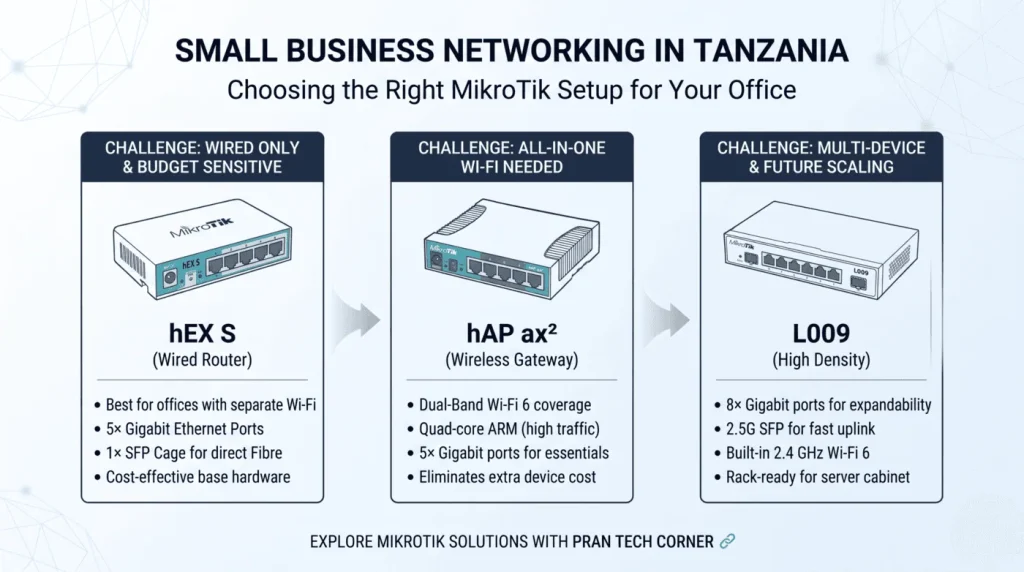
A reliable network is essential for businesses of every size. From connecting computers and point-of-sale terminals to supporting enterprise Wi-Fi, cloud accounting, and daily VoIP communication, the right hardware keeps teams productive and prevents costly downtime. When evaluating small business networking solutions in Tanzania, infrastructure requirements vary widely based on office layout, total client devices, and branch structure. Whether operating from a single office in Dar es Salaam or coordinating regional teams in Arusha, Dodoma, or Mwanza, companies need reliable hardware. While a boutique practice may require only a straightforward plug-and-play wired or wireless router, a growing enterprise often demands granular bandwidth control, VLAN segmentation, and flexible uplink options. MikroTik delivers enterprise-level RouterOS routing capabilities at an accessible price point. Three of the most practical options for Tanzanian SMEs are the hEX S, hAP ax², and L009. Why Small and Medium Businesses Need the Right Network Setup A commercial network does far more than distribute an internet connection. It establishes the backbone that secures internal files, isolates guest traffic, and ensures business-critical applications receive priority bandwidth over recreational browsing. A properly planned network architecture enables an SME to: Also read: Scaling Business WiFi in Tanzania: From Small Office to Enterprise with UniFi U6+, U6 Pro, and U7 Pro 3 Proven Small Business Networking Solutions in Tanzania: Selecting Your MikroTik Router. Different business models call for different physical interfaces and wireless configurations. Selecting the right hardware balances Ethernet port density, fibre handoff capability, and Wi-Fi coverage requirements. Which Router Fits Your Office? MikroTik hEX S (Pure Wired Routing) MikroTik hAP ax² (All-in-One Wi-Fi 6) MikroTik L009 (High Port Density) Ethernet Ports 5× Gigabit Ethernet 5× Gigabit Ethernet 8× Gigabit Ethernet SFP Cage (Uplink) 1× 1.25G SFP None 1× 2.5G SFP Wi-Fi Connectivity None (Requires External AP) Dual-Band Wi-Fi 6 (2.4 & 5 GHz) Single-Band Wi-Fi 6 (2.4 GHz only) PoE Support Passive PoE-in & PoE-out (Port 5) Passive PoE-in & PoE-out Passive PoE-in & PoE-out (Port 8) Form Factor Compact Desktop / Fanless Multi-position Desktop Tower Metal Desktop / 1U Rackmount Ready Best Suited For Workspaces with separate ceiling access points Small offices, cafes, and open work areas Multi-device offices, server racks, & branch hubs 1. MikroTik hEX S: For Wired-First Workspaces The MikroTik hEX S (RB760iGS) is a compact, fanless wired router equipped with five Gigabit Ethernet ports, a micro-SD slot, and an SFP cage. It is purpose-built for legal practices, accounting firms, and clinics where workstations, printers, and network storage connect primarily via physical Ethernet drops. Key Strengths: Best fit: Offices that run physical cabling to desks and prefer installing dedicated ceiling access points for wireless coverage. Detailed hardware technical specifications can be verified directly on the MikroTik official documentation. 2. MikroTik hAP ax²: For All-in-One Wired and Wi-Fi 6 Coverage. The MikroTik hAP ax² (C52iG-5HaxD2HaxD-TC) integrates commercial routing with modern dual-band Wi-Fi 6 (802.11ax) across both the 2.4 GHz and 5 GHz frequency bands, backed by a quad-core 64-bit ARM CPU. This makes it an attractive all-in-one gateway for small consultancies, retail hubs, and open-plan offices that require immediate wireless access alongside wired ports. Key Strengths: Best fit: Single-floor corporate offices, creative agencies, and retail branches needing reliable modern Wi-Fi and routing in a single chassis. 3. MikroTik L009: For Higher Port Density and Flexible Uplinks The MikroTik L009 (L009UiGS-2HaxD-IN) is engineered as a robust successor to the legacy RB2011 series. It provides eight Gigabit Ethernet ports, a 2.5G-capable SFP cage, and a built-in 2.4 GHz Wi-Fi 6 radio housed in a durable metal enclosure that doubles as a passive heatsink. It is designed for growing businesses that require extra physical switch ports and high-bandwidth network uplinks. Key Strengths: Note on Wireless: Because the onboard wireless on this model is dedicated to the 2.4 GHz spectrum, businesses requiring high-throughput 5 GHz wireless should deploy supplemental dual-band access points throughout the premises. Explore: How to Choose the Right Business WiFi and Networking Equipment in Tanzania with UniFi U6+, U6 Pro, U7 Pro and U-PoE+ Planning Practical Small Business Networking Solutions in Tanzania. Before purchasing hardware, evaluate operational and environmental factors to ensure stable daily performance: Deploy Reliable Small Business Networking Solutions in Tanzania with Pran Tech Corner. Selecting the right hardware prevents network instability and eliminates unnecessary IT expenses as your company scales. Whether configuring an initial wired setup with the hEX S, deploying an all-in-one wireless hub with the hAP ax², or scaling branch port capacity with the L009, MikroTik provides granular network control for modern enterprises. Pran Tech Corner supplies authentic networking equipment, routers, switches, and wireless hardware across Tanzania. Based on India Street in Dar es Salaam, we provide local stock availability, technical guidance, and reliable delivery across Dar es Salaam, Arusha, Moshi, Mwanza, Dodoma, and Mbeya.
Scaling Business WiFi in Tanzania: From Small Office to Enterprise with UniFi U6+, U6 Pro, and U7 Pro
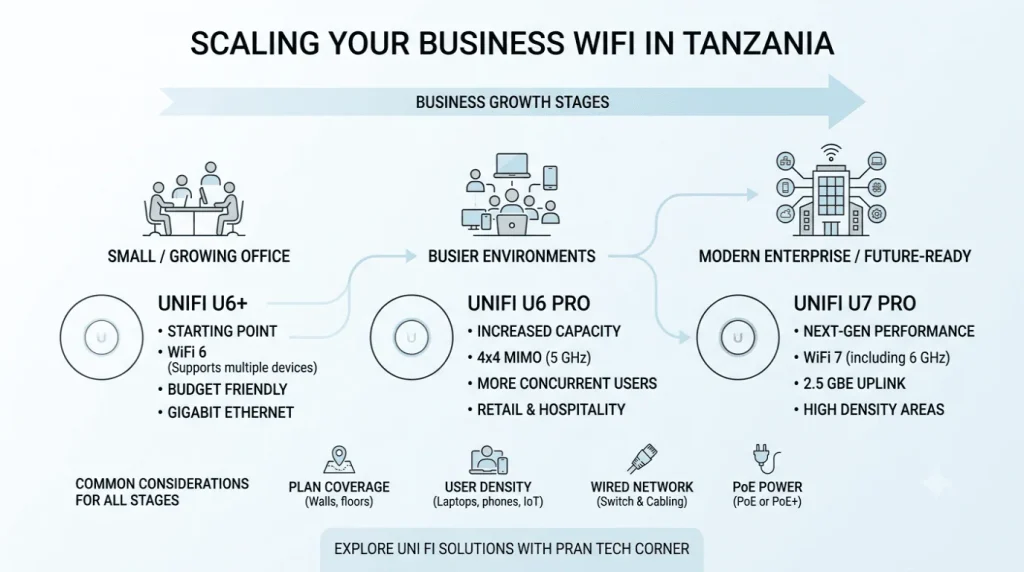
As companies across Dar es Salaam, Arusha, Mwanza, and rapidly growing commercial hubs throughout Tanzania expand their operations, their IT and networking needs shift dramatically. Adding more staff, migrating to cloud software (like accounting and ERP systems), and handling a surge of mobile devices mean that standard consumer routers simply cannot keep up. Before choosing networking hardware, it helps to understand what business Wi-Fi is and why it is important for modern companies. Unlike home internet setups, business Wi-Fi is engineered for heavy concurrent usage, seamless roaming across offices, strict security segmentation (such as isolating guest networks from company servers), and reliable coverage through thick concrete walls and multi-level office layouts. For organizations relying on High Speed Internet & Wi-Fi for Business Service Providers and enterprise-grade networks, deploying capable local hardware is essential. Pran Tech Corner supplies networking equipment and technology solutions for businesses across Tanzania, featuring Ubiquiti’s UniFi access points. In this guide, we explore how the UniFi U6+, U6 Pro, and U7 Pro support different stages of company growth, helping you build a wireless network that scales effortlessly with your operations. Why Scalable Wi-Fi Matters for Growing Tanzanian Businesses A Wi-Fi setup that works well for a startup of five people will quickly struggle when a business grows to twenty or fifty employees. Over time, companies introduce smart conference rooms, IP phones, wireless printers, point-of-sale (POS) terminals, and guest Wi-Fi for visitors—all competing for the same wireless airtime. Real-world operational bottlenecks that growing Tanzanian offices face include: Upgrading your internet package with your service provider doesn’t always solve these issues if your local access points can’t handle client traffic. A well-designed internal network ensures that your high-speed connection is distributed efficiently across every corner of your office. Choosing the Right Business WiFi Solutions for Small Offices and Enterprise Workspaces 1. UniFi U6+: A Practical Starting Point for Small Offices The Ubiquiti UniFi U6+ is a compact, cost-effective Wi-Fi 6 access point built for companies that need reliable, modern wireless performance without jumping straight to cutting-edge standards. As your business grows, the U6+ remains a versatile asset. You can keep it deployed in smaller private offices or low-density areas while placing higher-capacity access points in high-traffic spaces like open halls or reception zones. 2. UniFi U6 Pro: Built for Busier, High-Density Environments When your office grows into an open-plan workspace with dozens of active laptops, smartphones, and smart devices, your access points require extra wireless capacity to prevent lag and dropped connections. The U6 Pro excels at handling simultaneous connections, ensuring large teams can upload, download, and host video calls at the same time without network bottlenecks. 3. UniFi U7 Pro: Future-Proofing with Next-Gen Wi-Fi 7 For tech-forward enterprises building a brand-new office or executing a major IT upgrade, the UniFi U7 Pro introduces Wi-Fi 7 technology designed for long-term scalability. The standout feature of the U7 Pro is its 2.5 GbE uplink, which removes the bottleneck of standard 1 Gbps wired ports. To get the most out of this speed, pair the access point with compatible 2.5 GbE switches and structured cabling. (Note: Always check local spectrum standards via the Wi-Fi Alliance and local regulatory bodies like TCRA for 6 GHz operation in Tanzania). Model Comparison: Which UniFi Access Point Fits Your Business? Business Stage & Requirements Recommended Access Point Why It Works Small or Growing Office (Upgrading basic Wi-Fi) UniFi U6+ Affordable, efficient Wi-Fi 6 coverage for daily office tasks. Busy Workspace / Heavy Device Density UniFi U6 Pro 4×4 MIMO on 5 GHz band handles dense multi-user traffic smoothly. High-Bandwidth Enterprise Infrastructure UniFi U7 Pro Tri-band Wi-Fi 7 speed with a 2.5 GbE wired uplink for long-term readiness. Pro Tip: You don’t have to choose just one model. Ubiquiti’s UniFi Controller ecosystem allows you to mix and match the U6+, U6 Pro, and U7 Pro on the same network, managing all of them through a single centralized dashboard while tailoring hardware to the specific needs of each room. What to Consider When Expanding Your Business Wi-Fi Frequently Asked Questions Can different UniFi access points be used together in the same office? Yes. Compatible UniFi access points work together under a unified network controller. You can mix U6+, U6 Pro, and U7 Pro models across different areas of your building without creating separate networks or login credentials. Is the UniFi U6+ enough for a growing small business? Yes, for many small offices, the U6+ is an excellent starting point. It delivers reliable Wi-Fi 6 performance. As employee headcount or device density increases in specific rooms, you can add or swap in higher-capacity models like the U6 Pro where needed. Does the UniFi U7 Pro require a 2.5 GbE switch? The U7 Pro features a 2.5 GbE uplink port to deliver maximum data speeds. While it can plug into a standard Gigabit (1 Gbps) switch, its wired speed will be limited to 1 Gbps. Connecting it to a 2.5 GbE PoE+ switch unlocks its full throughput potential. Build a Scalable Business WiFi Network with Pran Tech Corner Scaling your office network doesn’t have to be complicated or full of guesswork. Whether you are setting up a new workplace in Dar es Salaam or expanding an established enterprise across Tanzania, choosing the right combination of access points ensures fast, reliable connectivity for every employee and device. Pran Tech Corner supplies genuine networking equipment and technology solutions tailored to businesses in Tanzania. Read our detailed article on choosing UniFi access points and PoE switches or contact our engineering team to get personalized guidance for your office infrastructure.
How to Choose the Right Business WiFi and Networking Equipment in Tanzania with UniFi U6+, U6 Pro, U7 Pro and U-PoE+
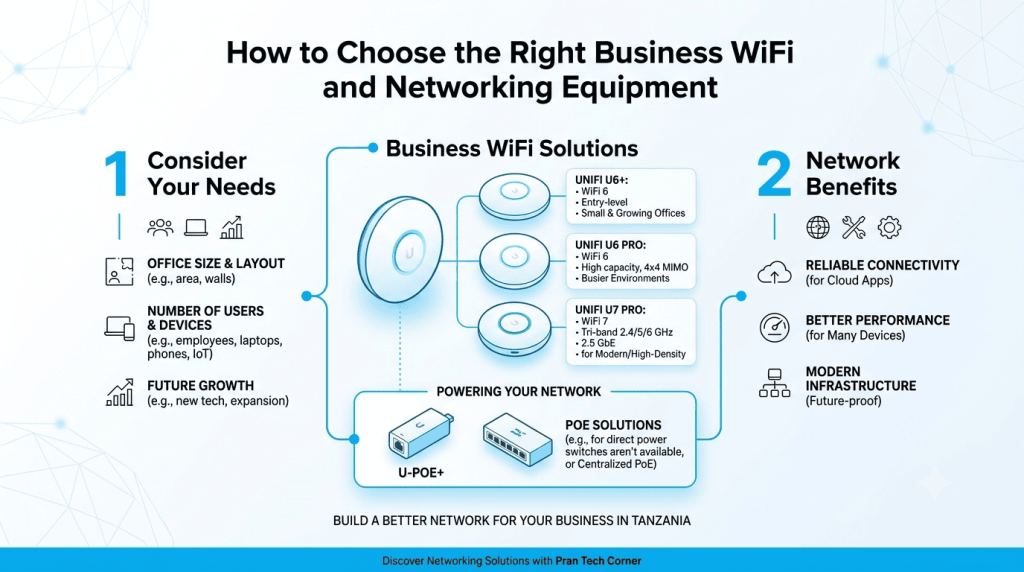
A reliable WiFi network has become an important part of everyday business. Employees need stable access to cloud applications, customers may need guest WiFi, and businesses increasingly depend on connected devices. For businesses in Tanzania, choosing the right WiFi setup depends on factors such as office size, number of users, building layout, connected devices and future network requirements. Pran Tech Corner provides networking equipment and technology solutions for businesses in Tanzania, including Ubiquiti UniFi products. The UniFi U6+, U6 Pro and U7 Pro offer different options for businesses looking to build or upgrade their wireless network. In this guide, we look at these UniFi access points, where they fit, and what Tanzanian businesses should consider before setting up a business WiFi network. Choosing the Right UniFi WiFi Solution for Your Business in Tanzania: UniFi U6+: A Practical Choice for Small and Growing Offices: The UniFi U6+ is a WiFi 6 access point for businesses that need modern wireless connectivity without moving to WiFi 7. It supports 2.4 GHz and 5 GHz WiFi, has a Gigabit Ethernet uplink and supports 300+ listed clients. The U6+ can be suitable for: For a growing business in Tanzania, the U6+ can be a practical starting point for a modern business WiFi network. UniFi U6 Pro: For Busier Business Environments: The UniFi U6 Pro is another WiFi 6 option, designed for environments where wireless demand is higher. It has six spatial streams and a 4×4 radio configuration on 5 GHz, along with a Gigabit Ethernet uplink. It can be considered for: The U6 Pro can be useful where businesses need more wireless capacity while continuing with a WiFi 6 network. UniFi U7 Pro: For Businesses Moving to WiFi 7: The UniFi U7 Pro brings WiFi 7 to business networks. It supports 2.4 GHz, 5 GHz and 6 GHz and uses a 2.5 GbE uplink. This makes it particularly relevant for businesses in Tanzania that are planning a newer wireless infrastructure or have newer WiFi 6E and WiFi 7 devices. The U7 Pro can be considered for: Ubiquiti U-PoE+: Supporting Your UniFi Access Point Setup: A reliable WiFi installation also needs the right power setup. The Ubiquiti U-PoE+ is a PoE+ adapter that can provide power to compatible UniFi devices through the network connection. It can be useful where a suitable PoE switch is not available at the installation point. For businesses in Tanzania setting up individual access points, branch offices or smaller deployments, a PoE adapter can make installation more straightforward. Larger deployments may instead use a central PoE switch to power multiple access points. Which UniFi Setup Makes Sense for Your Business? The choice depends on the size of the business, number of connected devices and the type of network being planned. This way, all four products have a clear purpose, rather than making the article feel like a product catalogue. It also keeps the focus firmly on business WiFi in Tanzania. What Should Businesses in Tanzania Consider Before Installing WiFi? 1. Coverage and Access Point Placement. Even a good access point can perform poorly if it is placed in the wrong location. Walls, floors, furniture and other obstacles can affect wireless coverage. Businesses should plan AP placement according to the actual office or building layout instead of simply installing an AP wherever a weak signal is reported. 2. Number of Users and Devices. The number of employees is only one part of the calculation. A business may have employees using laptops and smartphones alongside printers, cameras, POS systems and other connected devices. Planning should therefore consider the total number of connected devices. 3. The Network Behind the Access Point. An access point is only one part of the network. The U6+ and U6 Pro use Gigabit Ethernet uplinks, while the U7 Pro uses a 2.5 GbE uplink. The switch, Ethernet cabling and wider network infrastructure should therefore be able to support the access point being installed. 4. Power and PoE. Power over Ethernet allows compatible access points to receive power and network connectivity through Ethernet cabling. The Ubiquiti U-PoE+ is a PoE+ adapter that can be used with compatible devices where a suitable PoE switch is not available at the installation point. For larger deployments, businesses may instead use a suitable PoE switch to centralise power and network connectivity. Common WiFi Problems in Tanzanian Businesses: Build Your Business WiFi with Pran Tech Corner From a small office to a larger commercial network, the right WiFi setup depends on coverage, users, devices and future requirements. The UniFi U6+, U6 Pro and U7 Pro give businesses different options for WiFi 6 and WiFi 7 deployments, while the U-PoE+ can support compatible PoE requirements. For UniFi access points and business networking solutions in Tanzania, explore the networking products available from Pran Tech Corner and choose the setup that fits your business requirements. Looking for the right UniFi access point for your business? Pran Tech Corner provides networking equipment and solutions for businesses in Tanzania. You can explore the Pran Tech Corner networking solutions or browse the available networking products and speak with the team about your requirements. Frequently Asked Questions: