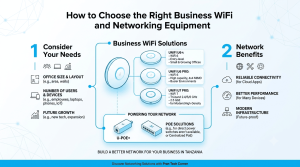
Centralised management can make it easier to deploy consistent Wi-Fi and switching policies across several rooms, floors or branches. TP-Link Omada products may suit businesses that want coordinated management, but the required controller, supported device models and feature compatibility should be checked before purchase.
Decide whether central management is worthwhile
For one small location, standalone configuration may be sufficient. Multiple access points, guest networks and several sites increase the value of central visibility and repeatable settings. A management platform can reduce repetitive administration, but it does not replace good network design or regular maintenance.
Check compatibility before mixing devices
Confirm which access points, switches and gateways are supported by the intended controller and whether required features are available on the exact hardware and firmware versions. Check PoE requirements, uplink speed and VLAN support. Similar product names can hide meaningful differences in capacity and features.
Build repeatable site policies
Document SSIDs, authentication, guest access, VLANs and firmware policy. If branches share a configuration, define what should be common and what must remain site-specific, such as IP ranges and local internet settings. Browse the networking equipment catalogue and confirm the model-level details.