
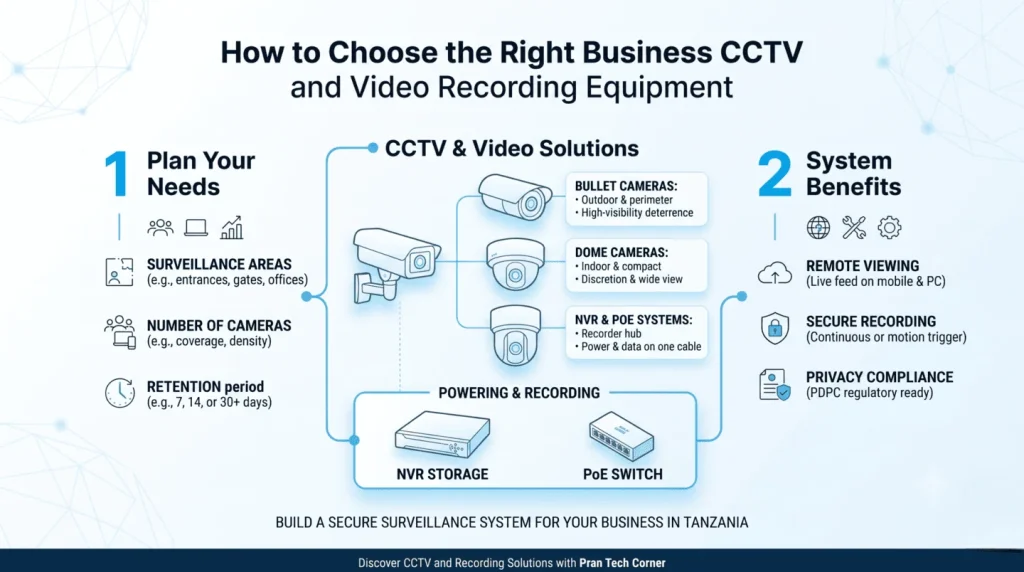
Choosing CCTV cameras in Tanzania is not simply a matter of comparing resolution or buying the cheapest camera. A reliable security system needs suitable camera positions, compatible recording equipment, sufficient storage, dependable network connectivity and a clear plan for who can access footage.
A typical IP CCTV system includes compatible IP cameras, an NVR, suitable storage drives, network cabling, required PoE equipment and secure remote access where needed. Camera count, recording bitrate and retention period determine the system capacity and storage requirement.
1. Plan Your CCTV System Before Buying Cameras
The first step is to decide what the system needs to monitor. A shop may need to cover its entrance, payment counter and stockroom. An office may need reception, corridors and selected access points. A warehouse may need loading bays, storage aisles and external boundaries.
The number of rooms or doors does not automatically determine camera count. One camera may cover a wide area but provide insufficient detail at a distant point. Plan around the purpose of each view and the detail required.
- Which entrances, exits and operational areas need monitoring?
- Is the purpose general observation, identification or monitoring a specific activity?
- Where will indoor and outdoor cameras be installed?
- How far is each camera from the recorder or network equipment?
- Is night-time or low-light performance important?
- How many days of footage must be retained?
- Who needs permission to view live footage or recordings?
2. IP Cameras vs Analogue CCTV Cameras
| Feature | IP CCTV system | Analogue CCTV system |
|---|---|---|
| Connection | Network connection, commonly Ethernet. | Typically coaxial cabling to a compatible recorder. |
| Recorder | Usually an NVR or compatible network platform. | Usually a DVR or compatible hybrid recorder. |
| Power | May use PoE or a separate compatible source. | Typically uses a separate camera power arrangement. |
| Expansion | Depends on network infrastructure and recorder capacity. | Depends on recorder channel capacity and cabling. |
| Typical consideration | New network-based systems and compatible integrations. | Upgrading an existing compatible coaxial installation. |
IP cameras transmit digital video over a network and can suit projects where network infrastructure, remote access and future expansion matter. The camera, network, recorder, storage and power arrangements must still be checked together.
3. NVR vs DVR: What Is the Difference?
An NVR (Network Video Recorder) records video from compatible IP cameras over a network. A DVR (Digital Video Recorder) is commonly used with analogue cameras connected through coaxial cabling.
- Choose an NVR when using compatible IP cameras and a network-based design.
- Consider a DVR when retaining a compatible analogue installation.
- Check hybrid support if combining camera technologies. Do not assume every recorder supports every camera.
Check camera channels, supported resolution, recording bandwidth, storage capacity and manufacturer compatibility before selecting a recorder.
4. Camera Resolution, Lens and Night Performance
Choose resolution for the required detail
Higher resolution can provide more image detail, but results also depend on the sensor, lens, lighting, compression and distance from the subject. Higher-resolution streams may also increase network and storage requirements.
Understand the lens and field of view
A wide-angle lens can cover a larger area, while a narrower view may be more suitable for observing a particular entrance or location at a distance. Plan for useful detail, not simply the widest view.
Check low-light performance
Consider whether the camera will operate in a well-lit office, dim corridor, parking area or location with changing light. Review low-light specifications, infrared performance and sample footage where available.
Check environmental protection
Outdoor cameras should suit their actual exposure to rain, dust, temperature and physical conditions. Confirm enclosure ratings and mounting requirements in the product documentation.
5. PoE, Cabling and Network Requirements
Power over Ethernet (PoE) allows a compatible network cable to carry data and electrical power to a compatible camera. This can simplify installation, but the camera, switch or injector and cabling must support compatible requirements.
Check the camera’s PoE standard and power consumption, total switch power budget, number of ports, network bandwidth, cable route and whether the recorder has suitable integrated PoE ports.
Explore Pran’s PoE products and network switches when planning infrastructure. Confirm compatibility for the exact products selected.
6. How Much Storage Do CCTV Cameras Need?
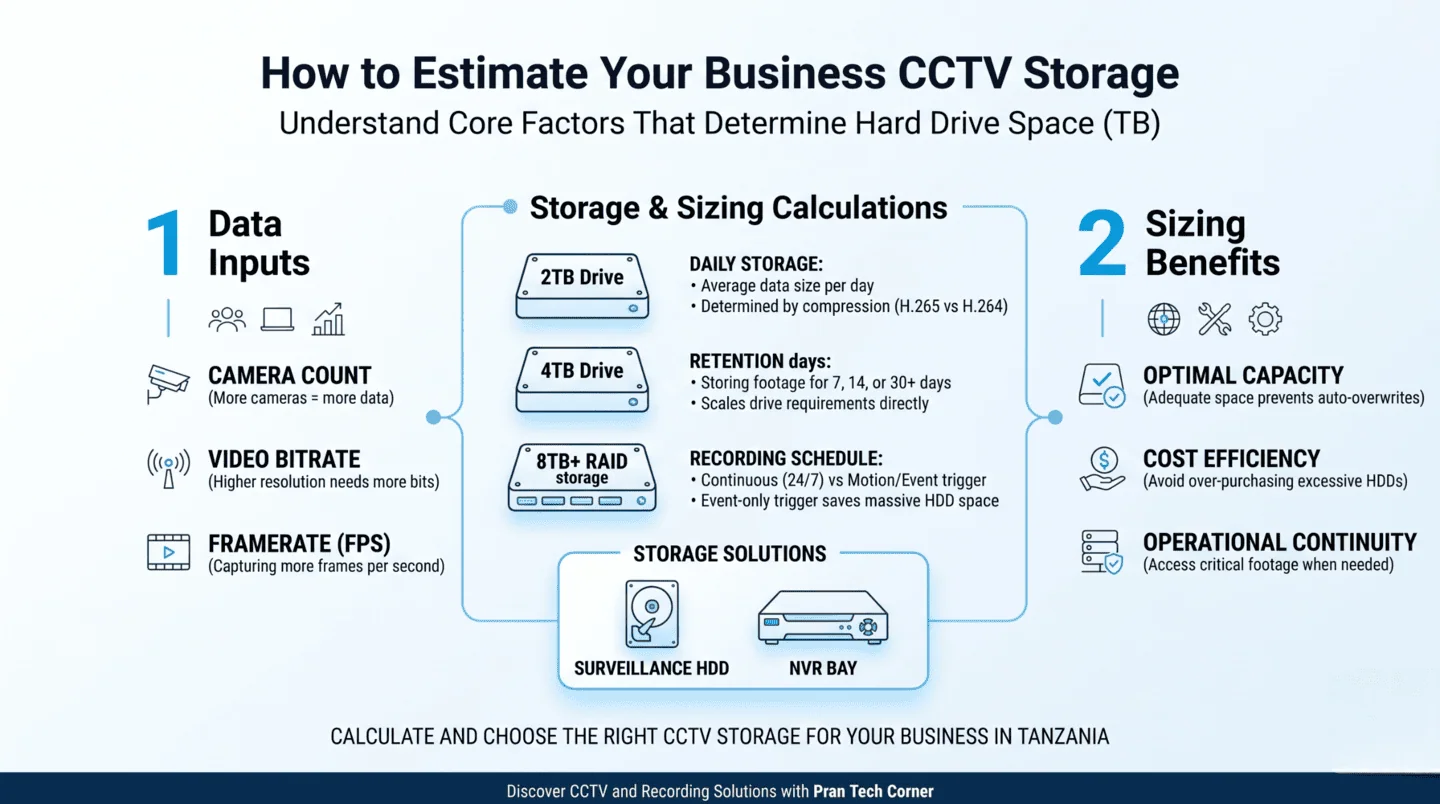
Storage depends on camera count, recording bitrate, recording schedule and retention period. Continuous recording generally uses more space than recording only during selected hours or events.
- Camera count: More cameras generally create more video data.
- Bitrate: Higher bitrate usually requires more storage.
- Resolution and frame rate: Higher detail and frame rates can increase storage use.
- Compression: Compression settings affect file size.
- Recording schedule: Continuous recording requires more space than event recording.
- Retention: Keeping footage for 30 days needs more space than keeping it for seven days.
Estimated storage (TB) = Cameras × Bitrate (Mbps) × Recording hours/day × Retention days × 0.00045 × 1.15.
For example, eight cameras averaging 2 Mbps each, recording 24 hours a day for 30 days, require approximately 5.96 TB using a 15% planning allowance. This is an illustration, not a fixed requirement for every eight-camera system.
7. CCTV Storage Calculator
Estimate Your CCTV Recording Storage
Enter the number of cameras, average bitrate, recording hours and retention period.
The default bitrate is an example. Replace it with the average bitrate for your camera and recording settings. The estimate uses decimal terabytes and includes a 15% planning allowance.
Before buying an NVR, check supported drive capacity, installed storage, number of bays, drive compatibility and recording bandwidth. You can review Pran’s video recorders and storage products.
8. Remote CCTV Viewing and System Security
Many modern IP systems support authorised remote viewing through a compatible application or platform. Because footage can be sensitive, restrict access to people who need it.
- Use unique, strong passwords and change default credentials.
- Enable multi-factor authentication where supported.
- Keep camera and recorder firmware updated.
- Give users only the permissions they need.
- Review accounts when employees or contractors leave.
- Avoid exposing recorder administration interfaces directly to the public internet.
- Maintain a process for viewing, exporting and deleting footage.
Where supported by the system design, consider separating surveillance devices from ordinary staff and guest networks.
9. CCTV Privacy and Data Protection in Tanzania
CCTV footage may identify individuals, so businesses should consider privacy and data protection before installing cameras. Tanzania’s Personal Data Protection Act, 2022 provides the legal framework for personal-data processing. The PDPC publishes registration guidance for data controllers and processors.
Businesses should assess their role and obligations under the Act and applicable regulations. They should also consider visible notices, camera positioning, access control and retention practices. The PDPC’s public notice on surveillance in private places warns against cameras in places where people have a reasonable expectation of privacy, such as toilets.
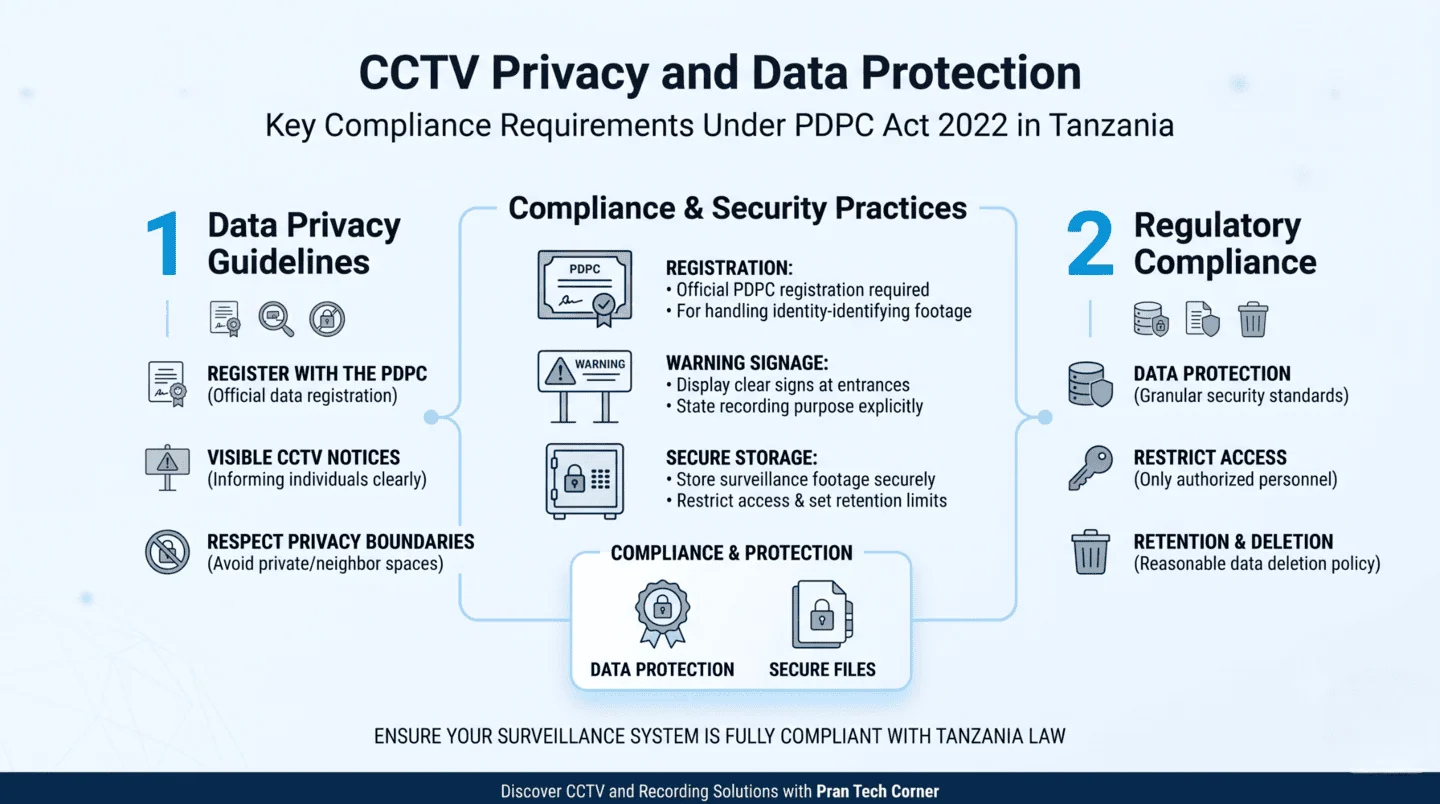
- Define the security purpose of each camera.
- Position cameras only where necessary for that purpose.
- Display appropriate notices.
- Avoid private spaces and unnecessary recording of neighbouring properties.
- Restrict access to footage.
- Set a sensible retention period and deletion process.
- Check PDPC registration and data-protection requirements.
This is general information, not legal advice. Organisations should review current requirements and seek clarification from the PDPC or a qualified legal professional where necessary.
10. What Affects CCTV Camera System Prices in Tanzania?
| Component | What affects the cost? |
|---|---|
| Cameras | Model, resolution, lens, low-light performance and environmental suitability. |
| NVR or recorder | Camera compatibility, channels, bandwidth, storage bays and capacity. |
| Hard drives | Required capacity, retention period and number of drives. |
| PoE and network equipment | Port count, power budget, bandwidth and layout. |
| Cabling and accessories | Cable quantity, route, connectors and mounting materials. |
| Power backup | UPS capacity, backup duration and equipment covered. |
| Installation | Mounting, cable routing, configuration, testing and site complexity. |
Compare quotations by checking whether they cover cameras only or a complete working system. Ask for exact model numbers, storage capacity, included accessories, installation scope, warranty and exclusions.
11. CCTV Cameras and Recorders from Pran Tech Corner
Pran Tech Corner supplies networking, security and IT infrastructure products for businesses in Tanzania. Its catalogue includes a Cameras category and a Video Recorders category.
The visible camera range includes UVC-series models such as UVC-AI-360, UVC-AI-Dome-W, UVC-AI-Pro and UVC-G5-Bullet. The recorder listing includes ENVR, UNVR and UNVR-Pro models. Confirm exact model compatibility, recording capacity and storage support before ordering.
For broader network requirements, also explore Pran’s networking products and PoE equipment.
Looking for CCTV Cameras in Tanzania?
Share your camera quantity, coverage requirements and recording period with Pran Tech Corner to discuss suitable cameras and recording equipment.
Explore CCTV Cameras | Explore Video Recorders | Contact Pran Tech Corner
12. Frequently Asked Questions
How much does a CCTV camera system cost in Tanzania?
Cost depends on camera models, camera count, recorder, storage, PoE equipment, cabling, installation and configuration. Ask for a quotation listing the equipment and installation components separately.
How many CCTV cameras does a business need?
The number depends on coverage, required detail, camera positioning and field of view. A site layout and coverage assessment are more reliable than choosing a count based only on rooms or doors.
Which is better: IP CCTV cameras or analogue cameras?
IP cameras suit network-based surveillance systems and compatible NVRs. Analogue cameras may be useful when upgrading an existing compatible coaxial installation. The best choice depends on infrastructure, features and expansion plans.
What is the difference between an NVR and a DVR?
An NVR records video from compatible IP cameras over a network. A DVR is generally used with analogue cameras connected through coaxial cabling.
How much storage do I need for eight CCTV cameras?
Storage depends on bitrate, recording hours and retention. Eight cameras averaging 2 Mbps each and recording continuously for 30 days need approximately 5.96 TB with a 15% planning allowance. Use the actual camera settings for a more accurate estimate.
Can I view CCTV cameras from my mobile phone?
Many modern IP systems support authorised remote viewing through a compatible app or platform. Configure secure accounts, network access and user permissions.
Do businesses in Tanzania need to consider data protection when installing CCTV?
Yes. CCTV footage may contain personal data. Review the Personal Data Protection Act, 2022, applicable regulations and PDPC guidance, including signage, camera positioning, access and retention.
Can outdoor CCTV cameras be installed in rainy areas?
Outdoor cameras should have enclosure protection suitable for actual exposure to rain, dust and other conditions. Confirm the manufacturer’s rating, mounting instructions and cable-entry protection.
References: PDPC registration guidance · PDPC surveillance notice · Personal Data Protection Act, 2022 · The Citizen: CCTV and data protection reporting