
CCTV Cameras in Tanzania: How to Choose IP Cameras, NVRs and Storage
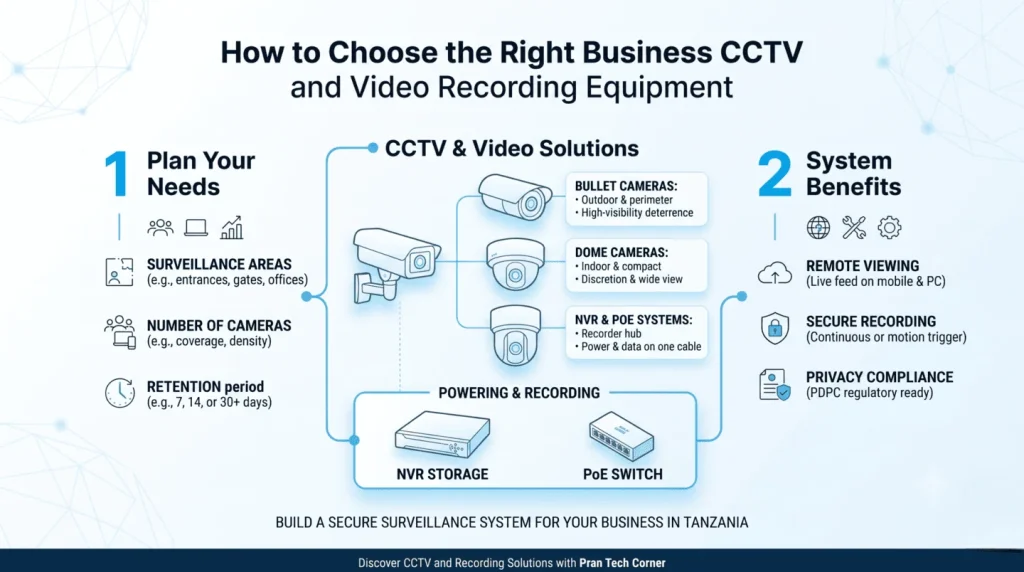
Choosing CCTV cameras in Tanzania is not simply a matter of comparing resolution or buying the cheapest camera. A reliable security system needs suitable camera positions, compatible recording equipment, sufficient storage, dependable network connectivity and a clear plan for who can access footage. Quick answer: What do you need for a complete CCTV system? A typical IP CCTV system includes compatible IP cameras, an NVR, suitable storage drives, network cabling, required PoE equipment and secure remote access where needed. Camera count, recording bitrate and retention period determine the system capacity and storage requirement. Table of Contents Plan the system IP vs analogue CCTV NVR vs DVR Resolution, lens and night performance PoE and network requirements CCTV storage needs Storage calculator Remote viewing and security Privacy and data protection in Tanzania What affects system prices? Pran Tech Corner products FAQs 1. Plan Your CCTV System Before Buying Cameras The first step is to decide what the system needs to monitor. A shop may need to cover its entrance, payment counter and stockroom. An office may need reception, corridors and selected access points. A warehouse may need loading bays, storage aisles and external boundaries. The number of rooms or doors does not automatically determine camera count. One camera may cover a wide area but provide insufficient detail at a distant point. Plan around the purpose of each view and the detail required. Which entrances, exits and operational areas need monitoring? Is the purpose general observation, identification or monitoring a specific activity? Where will indoor and outdoor cameras be installed? How far is each camera from the recorder or network equipment? Is night-time or low-light performance important? How many days of footage must be retained? Who needs permission to view live footage or recordings? 2. IP Cameras vs Analogue CCTV Cameras Feature IP CCTV system Analogue CCTV system Connection Network connection, commonly Ethernet. Typically coaxial cabling to a compatible recorder. Recorder Usually an NVR or compatible network platform. Usually a DVR or compatible hybrid recorder. Power May use PoE or a separate compatible source. Typically uses a separate camera power arrangement. Expansion Depends on network infrastructure and recorder capacity. Depends on recorder channel capacity and cabling. Typical consideration New network-based systems and compatible integrations. Upgrading an existing compatible coaxial installation. IP cameras transmit digital video over a network and can suit projects where network infrastructure, remote access and future expansion matter. The camera, network, recorder, storage and power arrangements must still be checked together. 3. NVR vs DVR: What Is the Difference? An NVR (Network Video Recorder) records video from compatible IP cameras over a network. A DVR (Digital Video Recorder) is commonly used with analogue cameras connected through coaxial cabling. Choose an NVR when using compatible IP cameras and a network-based design. Consider a DVR when retaining a compatible analogue installation. Check hybrid support if combining camera technologies. Do not assume every recorder supports every camera. Check camera channels, supported resolution, recording bandwidth, storage capacity and manufacturer compatibility before selecting a recorder. 4. Camera Resolution, Lens and Night Performance Choose resolution for the required detail Higher resolution can provide more image detail, but results also depend on the sensor, lens, lighting, compression and distance from the subject. Higher-resolution streams may also increase network and storage requirements. Understand the lens and field of view A wide-angle lens can cover a larger area, while a narrower view may be more suitable for observing a particular entrance or location at a distance. Plan for useful detail, not simply the widest view. Check low-light performance Consider whether the camera will operate in a well-lit office, dim corridor, parking area or location with changing light. Review low-light specifications, infrared performance and sample footage where available. Check environmental protection Outdoor cameras should suit their actual exposure to rain, dust, temperature and physical conditions. Confirm enclosure ratings and mounting requirements in the product documentation. 5. PoE, Cabling and Network Requirements Power over Ethernet (PoE) allows a compatible network cable to carry data and electrical power to a compatible camera. This can simplify installation, but the camera, switch or injector and cabling must support compatible requirements. Check the camera’s PoE standard and power consumption, total switch power budget, number of ports, network bandwidth, cable route and whether the recorder has suitable integrated PoE ports. Explore Pran’s PoE products and network switches when planning infrastructure. Confirm compatibility for the exact products selected. 6. How Much Storage Do CCTV Cameras Need? Storage depends on camera count, recording bitrate, recording schedule and retention period. Continuous recording generally uses more space than recording only during selected hours or events. Camera count: More cameras generally create more video data. Bitrate: Higher bitrate usually requires more storage. Resolution and frame rate: Higher detail and frame rates can increase storage use. Compression: Compression settings affect file size. Recording schedule: Continuous recording requires more space than event recording. Retention: Keeping footage for 30 days needs more space than keeping it for seven days. Core variables determining hard drive storage capacity for commercial CCTV systems. Estimated storage (TB) = Cameras × Bitrate (Mbps) × Recording hours/day × Retention days × 0.00045 × 1.15. For example, eight cameras averaging 2 Mbps each, recording 24 hours a day for 30 days, require approximately 5.96 TB using a 15% planning allowance. This is an illustration, not a fixed requirement for every eight-camera system. 7. CCTV Storage Calculator Estimate Your CCTV Recording Storage Enter the number of cameras, average bitrate, recording hours and retention period. Number of cameras Average bitrate per camera (Mbps) Recording hours per day Retention (days) Calculate CCTV Storage Enter your details and select Calculate CCTV Storage. The default bitrate is an example. Replace it with the average bitrate for your camera and recording settings. The estimate uses decimal terabytes and includes a 15% planning allowance. Before buying an NVR, check supported drive capacity, installed storage, number of bays, drive compatibility and recording bandwidth. You can review Pran’s video recorders and storage products. 8. Remote CCTV Viewing and System