
CCTV Cameras in Tanzania: How to Choose IP Cameras, NVRs and Storage
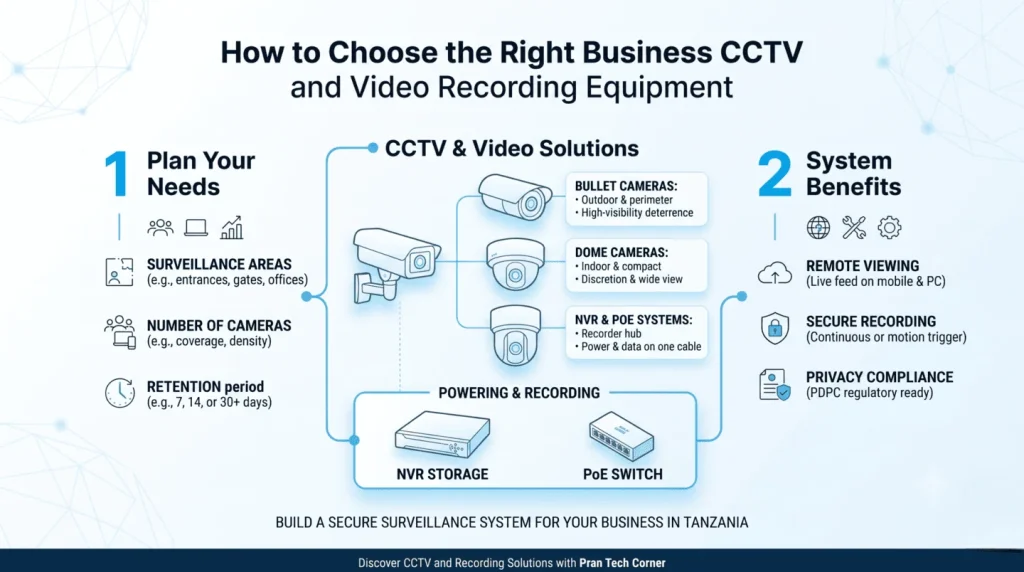
Choosing CCTV cameras in Tanzania is not simply a matter of comparing resolution or buying the cheapest camera. A reliable security system needs suitable camera positions, compatible recording equipment, sufficient storage, dependable network connectivity and a clear plan for who can access footage. Quick answer: What do you need for a complete CCTV system? A typical IP CCTV system includes compatible IP cameras, an NVR, suitable storage drives, network cabling, required PoE equipment and secure remote access where needed. Camera count, recording bitrate and retention period determine the system capacity and storage requirement. Table of Contents Plan the system IP vs analogue CCTV NVR vs DVR Resolution, lens and night performance PoE and network requirements CCTV storage needs Storage calculator Remote viewing and security Privacy and data protection in Tanzania What affects system prices? Pran Tech Corner products FAQs 1. Plan Your CCTV System Before Buying Cameras The first step is to decide what the system needs to monitor. A shop may need to cover its entrance, payment counter and stockroom. An office may need reception, corridors and selected access points. A warehouse may need loading bays, storage aisles and external boundaries. The number of rooms or doors does not automatically determine camera count. One camera may cover a wide area but provide insufficient detail at a distant point. Plan around the purpose of each view and the detail required. Which entrances, exits and operational areas need monitoring? Is the purpose general observation, identification or monitoring a specific activity? Where will indoor and outdoor cameras be installed? How far is each camera from the recorder or network equipment? Is night-time or low-light performance important? How many days of footage must be retained? Who needs permission to view live footage or recordings? 2. IP Cameras vs Analogue CCTV Cameras Feature IP CCTV system Analogue CCTV system Connection Network connection, commonly Ethernet. Typically coaxial cabling to a compatible recorder. Recorder Usually an NVR or compatible network platform. Usually a DVR or compatible hybrid recorder. Power May use PoE or a separate compatible source. Typically uses a separate camera power arrangement. Expansion Depends on network infrastructure and recorder capacity. Depends on recorder channel capacity and cabling. Typical consideration New network-based systems and compatible integrations. Upgrading an existing compatible coaxial installation. IP cameras transmit digital video over a network and can suit projects where network infrastructure, remote access and future expansion matter. The camera, network, recorder, storage and power arrangements must still be checked together. 3. NVR vs DVR: What Is the Difference? An NVR (Network Video Recorder) records video from compatible IP cameras over a network. A DVR (Digital Video Recorder) is commonly used with analogue cameras connected through coaxial cabling. Choose an NVR when using compatible IP cameras and a network-based design. Consider a DVR when retaining a compatible analogue installation. Check hybrid support if combining camera technologies. Do not assume every recorder supports every camera. Check camera channels, supported resolution, recording bandwidth, storage capacity and manufacturer compatibility before selecting a recorder. 4. Camera Resolution, Lens and Night Performance Choose resolution for the required detail Higher resolution can provide more image detail, but results also depend on the sensor, lens, lighting, compression and distance from the subject. Higher-resolution streams may also increase network and storage requirements. Understand the lens and field of view A wide-angle lens can cover a larger area, while a narrower view may be more suitable for observing a particular entrance or location at a distance. Plan for useful detail, not simply the widest view. Check low-light performance Consider whether the camera will operate in a well-lit office, dim corridor, parking area or location with changing light. Review low-light specifications, infrared performance and sample footage where available. Check environmental protection Outdoor cameras should suit their actual exposure to rain, dust, temperature and physical conditions. Confirm enclosure ratings and mounting requirements in the product documentation. 5. PoE, Cabling and Network Requirements Power over Ethernet (PoE) allows a compatible network cable to carry data and electrical power to a compatible camera. This can simplify installation, but the camera, switch or injector and cabling must support compatible requirements. Check the camera’s PoE standard and power consumption, total switch power budget, number of ports, network bandwidth, cable route and whether the recorder has suitable integrated PoE ports. Explore Pran’s PoE products and network switches when planning infrastructure. Confirm compatibility for the exact products selected. 6. How Much Storage Do CCTV Cameras Need? Storage depends on camera count, recording bitrate, recording schedule and retention period. Continuous recording generally uses more space than recording only during selected hours or events. Camera count: More cameras generally create more video data. Bitrate: Higher bitrate usually requires more storage. Resolution and frame rate: Higher detail and frame rates can increase storage use. Compression: Compression settings affect file size. Recording schedule: Continuous recording requires more space than event recording. Retention: Keeping footage for 30 days needs more space than keeping it for seven days. Core variables determining hard drive storage capacity for commercial CCTV systems. Estimated storage (TB) = Cameras × Bitrate (Mbps) × Recording hours/day × Retention days × 0.00045 × 1.15. For example, eight cameras averaging 2 Mbps each, recording 24 hours a day for 30 days, require approximately 5.96 TB using a 15% planning allowance. This is an illustration, not a fixed requirement for every eight-camera system. 7. CCTV Storage Calculator Estimate Your CCTV Recording Storage Enter the number of cameras, average bitrate, recording hours and retention period. Number of cameras Average bitrate per camera (Mbps) Recording hours per day Retention (days) Calculate CCTV Storage Enter your details and select Calculate CCTV Storage. The default bitrate is an example. Replace it with the average bitrate for your camera and recording settings. The estimate uses decimal terabytes and includes a 15% planning allowance. Before buying an NVR, check supported drive capacity, installed storage, number of bays, drive compatibility and recording bandwidth. You can review Pran’s video recorders and storage products. 8. Remote CCTV Viewing and System
The Right Networking Setup for Small and Medium Businesses in Tanzania: MikroTik hEX S, hAP ax², and L009
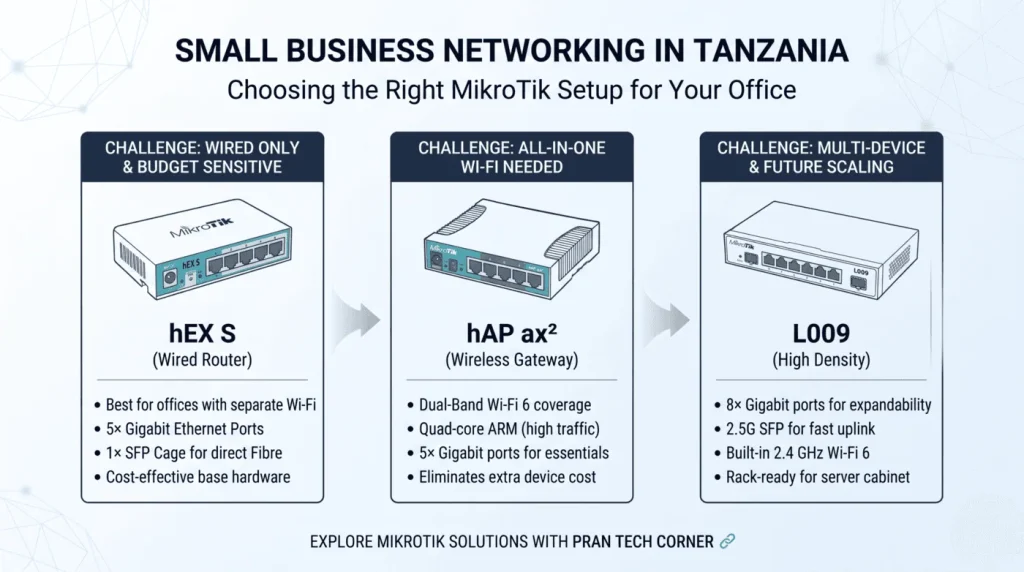
A reliable network is essential for businesses of every size. From connecting computers and point-of-sale terminals to supporting enterprise Wi-Fi, cloud accounting, and daily VoIP communication, the right hardware keeps teams productive and prevents costly downtime. When evaluating small business networking solutions in Tanzania, infrastructure requirements vary widely based on office layout, total client devices, and branch structure. Whether operating from a single office in Dar es Salaam or coordinating regional teams in Arusha, Dodoma, or Mwanza, companies need reliable hardware. While a boutique practice may require only a straightforward plug-and-play wired or wireless router, a growing enterprise often demands granular bandwidth control, VLAN segmentation, and flexible uplink options. MikroTik delivers enterprise-level RouterOS routing capabilities at an accessible price point. Three of the most practical options for Tanzanian SMEs are the hEX S, hAP ax², and L009. Why Small and Medium Businesses Need the Right Network Setup A commercial network does far more than distribute an internet connection. It establishes the backbone that secures internal files, isolates guest traffic, and ensures business-critical applications receive priority bandwidth over recreational browsing. A properly planned network architecture enables an SME to: Also read: Scaling Business WiFi in Tanzania: From Small Office to Enterprise with UniFi U6+, U6 Pro, and U7 Pro 3 Proven Small Business Networking Solutions in Tanzania: Selecting Your MikroTik Router. Different business models call for different physical interfaces and wireless configurations. Selecting the right hardware balances Ethernet port density, fibre handoff capability, and Wi-Fi coverage requirements. Which Router Fits Your Office? MikroTik hEX S (Pure Wired Routing) MikroTik hAP ax² (All-in-One Wi-Fi 6) MikroTik L009 (High Port Density) Ethernet Ports 5× Gigabit Ethernet 5× Gigabit Ethernet 8× Gigabit Ethernet SFP Cage (Uplink) 1× 1.25G SFP None 1× 2.5G SFP Wi-Fi Connectivity None (Requires External AP) Dual-Band Wi-Fi 6 (2.4 & 5 GHz) Single-Band Wi-Fi 6 (2.4 GHz only) PoE Support Passive PoE-in & PoE-out (Port 5) Passive PoE-in & PoE-out Passive PoE-in & PoE-out (Port 8) Form Factor Compact Desktop / Fanless Multi-position Desktop Tower Metal Desktop / 1U Rackmount Ready Best Suited For Workspaces with separate ceiling access points Small offices, cafes, and open work areas Multi-device offices, server racks, & branch hubs 1. MikroTik hEX S: For Wired-First Workspaces The MikroTik hEX S (RB760iGS) is a compact, fanless wired router equipped with five Gigabit Ethernet ports, a micro-SD slot, and an SFP cage. It is purpose-built for legal practices, accounting firms, and clinics where workstations, printers, and network storage connect primarily via physical Ethernet drops. Key Strengths: Best fit: Offices that run physical cabling to desks and prefer installing dedicated ceiling access points for wireless coverage. Detailed hardware technical specifications can be verified directly on the MikroTik official documentation. 2. MikroTik hAP ax²: For All-in-One Wired and Wi-Fi 6 Coverage. The MikroTik hAP ax² (C52iG-5HaxD2HaxD-TC) integrates commercial routing with modern dual-band Wi-Fi 6 (802.11ax) across both the 2.4 GHz and 5 GHz frequency bands, backed by a quad-core 64-bit ARM CPU. This makes it an attractive all-in-one gateway for small consultancies, retail hubs, and open-plan offices that require immediate wireless access alongside wired ports. Key Strengths: Best fit: Single-floor corporate offices, creative agencies, and retail branches needing reliable modern Wi-Fi and routing in a single chassis. 3. MikroTik L009: For Higher Port Density and Flexible Uplinks The MikroTik L009 (L009UiGS-2HaxD-IN) is engineered as a robust successor to the legacy RB2011 series. It provides eight Gigabit Ethernet ports, a 2.5G-capable SFP cage, and a built-in 2.4 GHz Wi-Fi 6 radio housed in a durable metal enclosure that doubles as a passive heatsink. It is designed for growing businesses that require extra physical switch ports and high-bandwidth network uplinks. Key Strengths: Note on Wireless: Because the onboard wireless on this model is dedicated to the 2.4 GHz spectrum, businesses requiring high-throughput 5 GHz wireless should deploy supplemental dual-band access points throughout the premises. Explore: How to Choose the Right Business WiFi and Networking Equipment in Tanzania with UniFi U6+, U6 Pro, U7 Pro and U-PoE+ Planning Practical Small Business Networking Solutions in Tanzania. Before purchasing hardware, evaluate operational and environmental factors to ensure stable daily performance: Deploy Reliable Small Business Networking Solutions in Tanzania with Pran Tech Corner. Selecting the right hardware prevents network instability and eliminates unnecessary IT expenses as your company scales. Whether configuring an initial wired setup with the hEX S, deploying an all-in-one wireless hub with the hAP ax², or scaling branch port capacity with the L009, MikroTik provides granular network control for modern enterprises. Pran Tech Corner supplies authentic networking equipment, routers, switches, and wireless hardware across Tanzania. Based on India Street in Dar es Salaam, we provide local stock availability, technical guidance, and reliable delivery across Dar es Salaam, Arusha, Moshi, Mwanza, Dodoma, and Mbeya.
IT Solutions for Businesses in Tanzania: How to Plan Technology That Fits
A practical IT plan starts with how a company works, not with a shopping list of devices. A growing office may need stable internet, shared printers.
IT Infrastructure for Modern Offices in Dar es Salaam
An office network is more than the internet connection. It includes cabling, switches, routers, Wi-Fi, power protection and the security controls.
Access Point Placement: How to Improve WiFi Coverage Without Buying More Devices
Adding more access points is not always the best way to fix poor Wi-Fi. A device hidden behind a television, installed inside a metal cabinet or.
How to Choose Outdoor Security Cameras for Business Premises
Outdoor surveillance equipment faces weather, changing light, vibration and a greater risk of tampering. Camera selection should begin with the.
Video Recorder Selection for CCTV: NVR Channels, Bandwidth and Storage
A network video recorder is not selected by channel count alone. The recorder must accept the combined video bandwidth, support the required camera.
Small Business Network Backup and Recovery: Configurations, Inventory and Failover
Network resilience is not only about buying redundant hardware. Recovery depends on knowing what is installed, having current configurations.
Network Equipment Checklist for a New Office Setup in Tanzania
A new office can lose time and money when equipment arrives before the network layout is understood. A simple checklist helps coordinate internet.
Choosing Network Accessories: Patch Panels, Transceivers, Injectors and Cables
Small accessories can determine whether a network installation is compatible and maintainable. Patch panels, transceivers, PoE injectors and cables.